Frequently Asked Questions
This page contains an assortment of “frequency asked questions” related to Astroneer modding, answered in short form.
If you are a modder, your contributions would be greatly appreciated, no matter how simple or complex. Adding an entry to this page is a great way to help fill some of the gaps in our existing documentation and help future modders solve difficult problems that you may have already solved. If you’d like to contribute to this project, please submit a pull-request on the AstroTechies/astroneermodding GitHub repository that adds your new question to the faq.rst file.
General Questions
How can I get help with modding Astroneer?
If you have any questions or are facing any issues that are not answered by this documentation, please feel free to join the Astroneer Modding Discord server and ask your questions there. You can join the Discord server using the following invite link: https://discord.gg/bBqdVYxu4k
What mod managers can I use to install mods for Astroneer?
You can find a list of all mod managers that support Astroneer under Compatibility on the Metadata Standard page.
Why are there two major community mod loaders (astro_modloader and AstroModLoader Classic)?
The first mod loader for Astroneer was called AstroModLoader by AstroTechies (primarily developed by atenfyr in 2020). When atenfyr initially left the Astroneer Modding community in late 2021, Konsti and localcc decided to rewrite AstroModLoader, along with AstroModIntegrator and UAssetAPI, into the Rust programming language. astro_modloader (Rust) was created from this effort.
In late 2024, Konsti shut down the astroneermods.space website and left the Astroneer Modding community, which caused astro_modloader (Rust) to become unmaintained. Shortly thereafter, atenfyr returned to the Astroneer Modding community, began to maintain astro_modloader (Rust), and also created his own updated fork of the original AstroTechies AstroModLoader, which is now AstroModLoader Classic.
Both mod loaders are currently maintained and are compatible with most Astroneer mods, but there are some variations that exist between each mod manager’s implementation of the mod integrator, discussed further in the Compatibility section of the Metadata Standard page. Most notably, astro_modloader (Rust) does not currently support UE4SS mods or custom routines.
How can I implement Astroneer support for my custom mod manager?
The simplest strategy for implementing Astroneer support for your own mod manager is to implement support for managing UE4SS mods, and then require that all users install the AutoIntegrator C++ mod, which is a UE4SS mod that allows AstroModLoader mods to be loaded as UE4SS LogicMods by executing the mod integrator on game launch. This reduces the complexity of the implementation to simple file management. Many other Unreal Engine games use UE4SS for managing their mods, so any implementation that brings mod support to those games can typically be cloned to implement support for Astroneer.
Can I use mods on dedicated servers?
Yes, you can use mods on dedicated servers. Some mods need to be installed on both the client and the server (sync = “serverclient”), whereas other mods can be installed on just the client (sync = “client”) or just the server (sync = “server”).
If you are playing a co-op game, no extra action needs to be taken for you to play with mods in multiplayer, as long as the other players also have the required mods installed.
If you are self-hosting a dedicated server, you can install mods by placing a copy of AstroModLoader Classic at the root folder of the server installation directory and executing the mod loader normally. You can otherwise pass the --server command line parameter to the AstroModLoader Classic executable file.
As a last resort, you can also simply copy your local %localappdata%\Astro\Saved\Paks folder (including the integrated 999-AstroModIntegrator_P.pak file) onto the server machine. You would need to perform this step again along with a re-integration (by opening the mod loader again on your local machine) at least once every time that the game updates, or at any point in time that you wish to change your set of mods.
Can I use mods on Linux?
Yes, you can use mods on Linux. This section discusses four ways that you can set up Astroneer mods on Linux.
You can execute astro_modloader (Rust) natively on Linux by simply downloading and executing the astro_modloader-linux-x64 binary from the Releases page of the repository.
You can also run AstroModLoader Classic on Linux, but only through Wine; there is no native Linux binary for this software. You can do that by following this guide: https://github.com/atenfyr/AstroModLoader-Classic?tab=readme-ov-file#linux-setup
You may also choose to use mods on Linux by installing UE4SS and AutoIntegrator, both of which are tested to work well through Proton. AutoIntegrator requires some additional steps to run through Proton. You can find more information about installing AutoIntegrator for Linux here: https://github.com/atenfyr/AutoIntegrator?tab=readme-ov-file#autointegrator
Finally, you could also choose to simply execute AstroModIntegrator Classic natively on Linux through the command line (use the ModIntegrator-linux-x64 binary provided on the Releases page of the AstroModLoader Classic repository).
Can I develop mods on Linux?
Most mod development infrastructure is designed for Windows, and it is highly recommended to develop mods on the Windows operating system.
It is possible to use repak (natively), UAssetGUI (with Wine + Mono), and the Unreal Editor (natively for Ubuntu) on Linux. You may wish to review the following guides:
repak (easy): simply download published Linux binaries from GitHub https://github.com/trumank/repak/releases
UAssetGUI (medium): https://github.com/atenfyr/UAssetGUI?tab=readme-ov-file#linux-setup
Unreal Editor (hard): https://github.com/AstroTechies/ModdingKit?tab=readme-ov-file#linux-usage
Can I use mods with a pirated version of the game?
We do not provide support for users using pirated copies of Astroneer.
Can I use mods without any external mod management software?
Yes, you can avoid using any external mod management software by manually executing the mod integrator via the command line, if you so choose. The mod integrator is an absolute requirement for playing with Astroneer mods. This technique will not work for UE4SS mods.
Place your .pak files manually at the appropriate path (in the %localappdata%\Astro\Saved\Paks directory on Windows). Download the ModIntegrator-win-x64.exe binary or the ModIntegrator-linux-x64 binary from the atenfyr/AstroModLoader-Classic GitHub repository. Then, execute the binary with no parameters to receive information about the required command line parameters. You must execute the mod integrator at least once every time that the game updates, or at any point in time that you change your list of mods.
How do I install a mod using a mod manager?
Mods are distributed as .pak files. Simply drag-and-drop the mod’s .pak file onto the window of the mod manager you are using.
How can I tell if a mod is compatible with the latest game version?
Any mods that were last updated before November 21st, 2025 are incompatible with the latest version of the game, because the recent MEGATECH update (1.36.42.0) updated the Unreal Engine version of the game from 4.23 to 4.27, which required that all mods be re-cooked. (A similar incident occurred in 2022 with the “Xenobiology Update” [1.24.29.0], which updated the engine version from 4.18 to 4.23)
Many mods specify the game_build field in their metadata.json file, which provides information about what version of the game the mod is intended to be used with. If this version is unspecified or is not the latest version of the game, the mod is not guaranteed to work, but may work nonetheless. Any mod that is designed for game version 1.35 or earlier is guaranteed to not function on the latest version of the game.
What is a .pak file?
The .pak format is an archive file format used by the Unreal Engine for storing multiple files of any type. It is similar in concept to a .zip or .rar file. These files are relatively simple to “zip” or “unzip” using external tools such as trumank’s repak.
The .pak format includes support for compression and encryption. As of January 2026, the Astroneer .pak file is compressed, but not encrypted.
What is a .uasset file?
The .uasset format is a file format used by the Unreal Engine to store game assets.
Game assets can either be uncooked, meaning that they are designed for use in the Unreal Editor, or cooked, meaning that they are designed to be loaded by a shipped game and have had editor data stripped for performance reasons.
Uncooked assets can be opened simply by placing them in an Unreal Editor project’s Content directory and opening them in the Unreal Editor.
Cooked assets, such as those found in .pak files, can be examined and modified at a low level using tools like atenfyr’s UAssetGUI.
It is theoretically possible to reconstruct uncooked assets from the information contained within cooked assets, although tools to do so are currently severely limited (as of 2025), meaning that it is often easier to recreate assets in the Unreal Editor by hand. Such tools that have been developed in the past include JsonAsAsset and UEAssetToolkitGenerator.
What is a .uexp file?
A .uexp file is an extension of a .uasset file, containing the body of each export in binary blob form (i.e., the “Export Information” tab in UAssetGUI). In older versions of the engine, these two files are instead merged together into a single .uasset file. For Astroneer, every .uasset file requires that a .uexp file be present with the same name in the same directory in order for the asset to be parsed.
What is the “mod integrator?”
The mod integrator is a piece of software that modifies base game assets on behalf of other mods. The mod integrator executes whenever a mod is added or removed (or more often) and produces a new mod with the filename 999-AstroModIntegrator_P.pak that contains automatically-modified base game assets. The purpose of the mod integrator is to allow multiple mods to make certain modifications to the same base game asset at once and thus reduce mod conflict, because a base game asset can only be modified by one mod at a time.
Mods communicate with the mod integrator by providing a metadata.json file within the mod’s .pak file. The metadata.json file follows a standardized file format (see the Metadata Standard page) that contains information about what the integrator should do on the mod’s behalf, among other things. This includes routines like: adding custom Actors to the level; attaching custom Actor Components to base game Actors; adding custom mission trailheads to the level; adding items to base game item lists; and so on.
Two major implementations of the “mod integrator” exist: AstroModIntegrator Classic and astro_mod_integrator (Rust). AstroModIntegrator Classic is used by AstroModLoader Classic and AutoIntegrator-based mod loaders, and astro_mod_integrator (Rust) is used by astro_modloader (Rust). There are some minor variations that exist between each of these implementations of the mod integrator, discussed further in the Compatibility section of the Metadata Standard page.
The modding communities for some other Unreal Engine games, such as State of Decay 2, have adopted the concept of a “mod integrator” as well, but most Unreal Engine games instead choose to create mods by exclusively using tools like UE4SS, which can perform at runtime much of the actions that the mod integrator performs.
What is the difference between a package name and a raw file path?
When internally referring to the location of packages (game assets), the Unreal Engine uses the /Game/ path as a shorthand for the Astro\Content directory, consistently uses the forward slash (/) as a directory separator instead of the backslash (\), and neglects file extensions.
For example, a package name could be something like /Game/Items/ItemTypes/FloodLight_IT, which corresponds to the file loaded at the raw file path Astro\Content\Items\ItemTypes\FloodLight_IT.uasset. When packaging a .pak file, all files should be located at their raw file path (i.e., never create a folder named Game at the root of your .pak file).
You may also see other prefixes used where a package name would be located, such as /Script, which is used to refer to classes defined in a specific C++ module (see the Source/Astro/Public directory within the ModdingKit to examine classes provided under the /Script/Astro path).
Game Asset Questions
How can I access the base game’s assets?
Follow the guide on the Setting up Modding Tools page.
I’m getting this error when I try to unpack a .pak file: “Error reading header! Error: Unsupported pak version: 11”!
You are likely still using the “unreal_pak_cli” tool, which fails to parse some .pak files, including the base game’s .pak file. You should migrate to trumank’s repak, which is discussed further on the Setting up Modding Tools page.
How can I examine and modify .uasset files?
You can examine and modify .uasset files using atenfyr’s UAssetGUI, which is discussed further on the Basic Modding page. UAssetGUI is used to modify assets for a wide variety of different Unreal games, but it originated from the Astroneer Modding community, so it is well-suited for parsing and modifying Astroneer game assets.
Can I write my own scripts for manipulating .uasset files?
Yes, you can write your own programs for manipulating .uasset files using atenfyr’s UAssetAPI, which UAssetGUI is based on. Several guides and some documentation for interfacing with UAssetAPI using the C# programming language are available here: https://atenfyr.github.io/UAssetAPI/
Alternatively, UAssetGUI can be used directly to convert .uasset files to-and-from the JSON format via the command line, which can then be used to indirectly examine and manipulate .uasset files in any programming language. You can find more information about UAssetGUI’s command line arguments here: https://github.com/atenfyr/UAssetGUI?tab=readme-ov-file#command-line-arguments
How can I find the class that something inherits from?
In UAssetGUI, locate the BlueprintGeneratedClass export for the asset in question and click on “UStruct Data”. The parent class of the class represented by this export is specified in the “Super Struct” field.
How can I find the Class Default Object of some class?
In UAssetGUI, locate the BlueprintGeneratedClass export for the asset in question and click on “UStruct Data”. The Class Default Object is the export specified by the property “ClassDefaultObject”. This export contains the default value of each of the class’s properties for all instances of this class.
How can I get a list of properties that are available in some export?
First, download and import this set of mappings into UAssetGUI using the Utils -> Import mappings… option (as of the time of writing, you must use latest experimental): Astro.jmap.gz
Once these mappings are imported and then selected in the top-right of the UAssetGUI menu, you can select any export and choose the Utils -> Dump serializable properties… option. This option dumps and opens a .txt file containing all of the valid properties (and their types) that can be specified for the currently selected export.
These mappings are not required to parse assets for Astroneer (although they are required to parse assets for many other games, including almost all UE5 games), but providing UAssetGUI with a copy of these mappings does have additional benefits, including the ability to dump extra metadata and provide resolution for rare ambiguous serialization.
Why is this export missing some properties?
You are likely observing “delta serialization,” where the Unreal Engine deliberately omits serializable properties that have not been changed from their default values. This means that any available property that is not specified is automatically set to its default value.
To set your own value for a property that was not written due to delta serialization, simply directly add a new row to the export containing the correct name, type, and desired value(s). See the answer to the “How can I get a list of properties that are available in some export?” question for more information on how you can determine the name and type of available properties. You do not need to manually specify the ArrayIndex, Serial Offset, or IsZero fields when creating a new row in UAssetGUI.
How can I change every instance of a string within an asset?
In many cases, this can be done by modifying the respective entry in the asset’s Name Map. Modifying an entry in the Name Map will change every instance of the name in the asset from the old value to the new value.
Can I add my own imports to an asset?
Yes, you can add new rows under the “Import Data” tab as needed.
Can I add my own exports to an asset?
Yes, you can add a custom export to an asset. Simply add a new row under the “Export Information” tab, and then select View -> Recalculate Nodes.
The new export will be a typical “NormalExport”. The type of the export typically cannot be changed without using UAssetAPI directly or modifying an exported .json file. It is also vitally important to ensure that all fields are specified properly for the new export, including preload dependencies, for the export to load properly in-game. Adding new exports to an asset is an advanced technique that should generally be avoided when possible.
Can I import/export assets to JSON?
Yes, you can export an asset to JSON in UAssetGUI by choosing File -> Save As and changing the output file type to “UAssetAPI JSON”. You can then directly re-open the exported .json file (with or without modifications) in UAssetGUI.
The UAssetAPI JSON format is essentially a direct dump of how UAssetAPI represents the asset in memory, and is often difficult to read or effectively modify. There is also no guarantee that a UAssetAPI JSON file will properly parse in future versions of UAssetAPI/UAssetGUI, so exported .json files should generally not be used for long-term storage of assets.
What is Kismet bytecode?
“Kismet bytecode” refers to the proprietary bytecode format used by the Unreal Engine for storing blueprint graphs in cooked game assets for execution. It is similar in concept to Java bytecode or .NET’s Common Intermediate Language (CIL/IL).
Can I read and modify Kismet bytecode in UAssetGUI?
You can read Kismet bytecode in UAssetGUI by selecting the “ScriptBytecode” tab within a Function export. The displayed .json format is a rudimentary visualization and is read-only; it is possible to modify Kismet bytecode by unchecking “Enable pretty bytecode” in the UAssetGUI Settings menu, although this raw format is not practical to modify to any reasonable degree.
To assist in Kismet bytecode-related work, you may wish to use trumank’s kismet-analyzer tool for analyzing and manipulating Kismet bytecode, or you may wish to build CorporalWill123’s work-in-progress fork of UAssetGUI, which contains rudimentary node editor support for Kismet bytecode.
What is “Raw Data” or “Extra Data” in UAssetGUI?
For many kinds of exports, UAssetAPI does not contain full serialization support, whether that be because serialization support for that specific export is deprioritized or simply incomplete. In these cases, UAssetGUI will provide an “Extra Data” entry in the tree view, allowing the remaining unparsed binary data to be viewed. In other cases, an export will fail to parse entirely because of some error in the UAssetAPI source code, which will result in the export simply being presented as a raw byte array in a “Raw Data” entry in the tree view.
For both “Extra Data” and “Raw Data”, it is possible to view the data in hexadecimal form by selecting the “Extra Data” or “Raw Data” entry in the tree view. The binary data can be imported, exported, or set to a specific number of null bytes using the “Import”, “Export”, and “Set to null…” buttons above the hex view. In the case of the “Set to null…” button, a prompt will appear requesting the user to enter the number of desired null bytes to replace the binary data with. It is not recommended to attempt to modify this binary data except for in specific circumstances (such as when attempting to create a new export from scratch).
How can I find what asset an ObjectProperty points to?
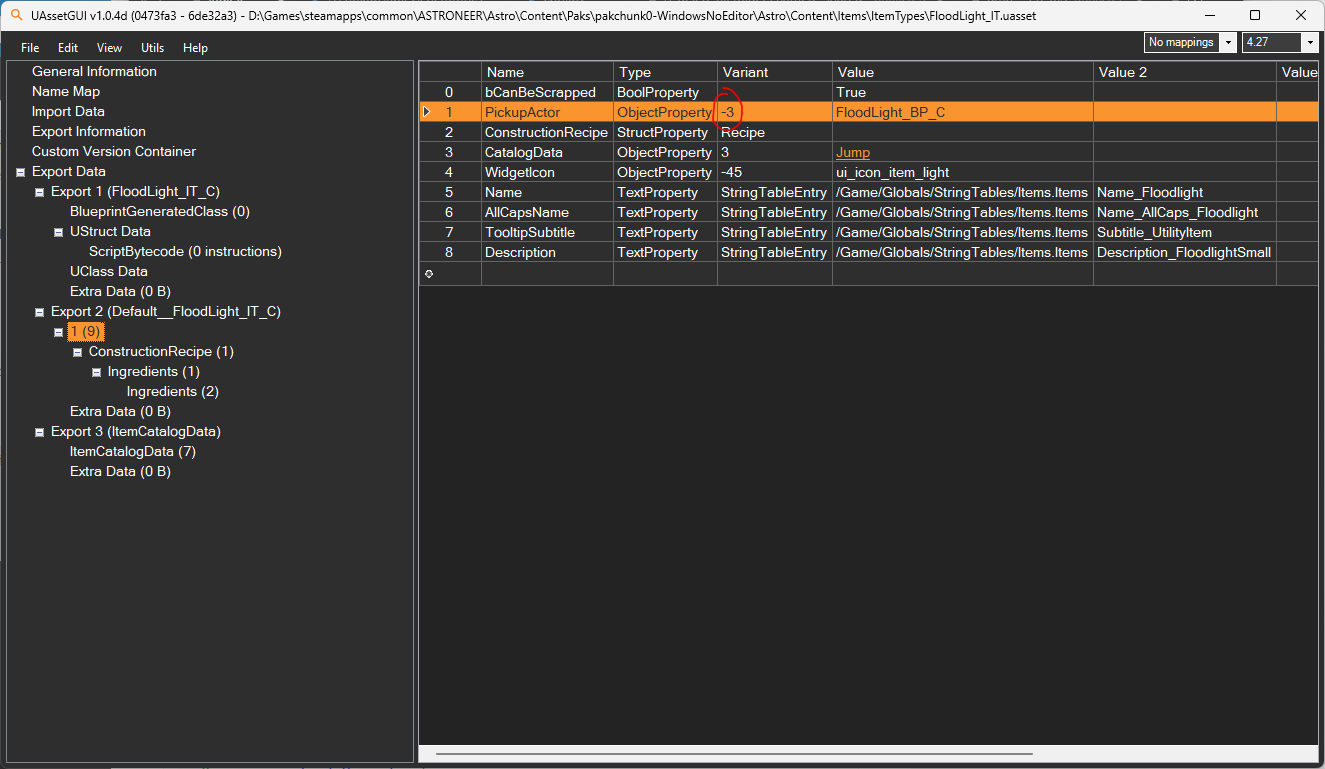
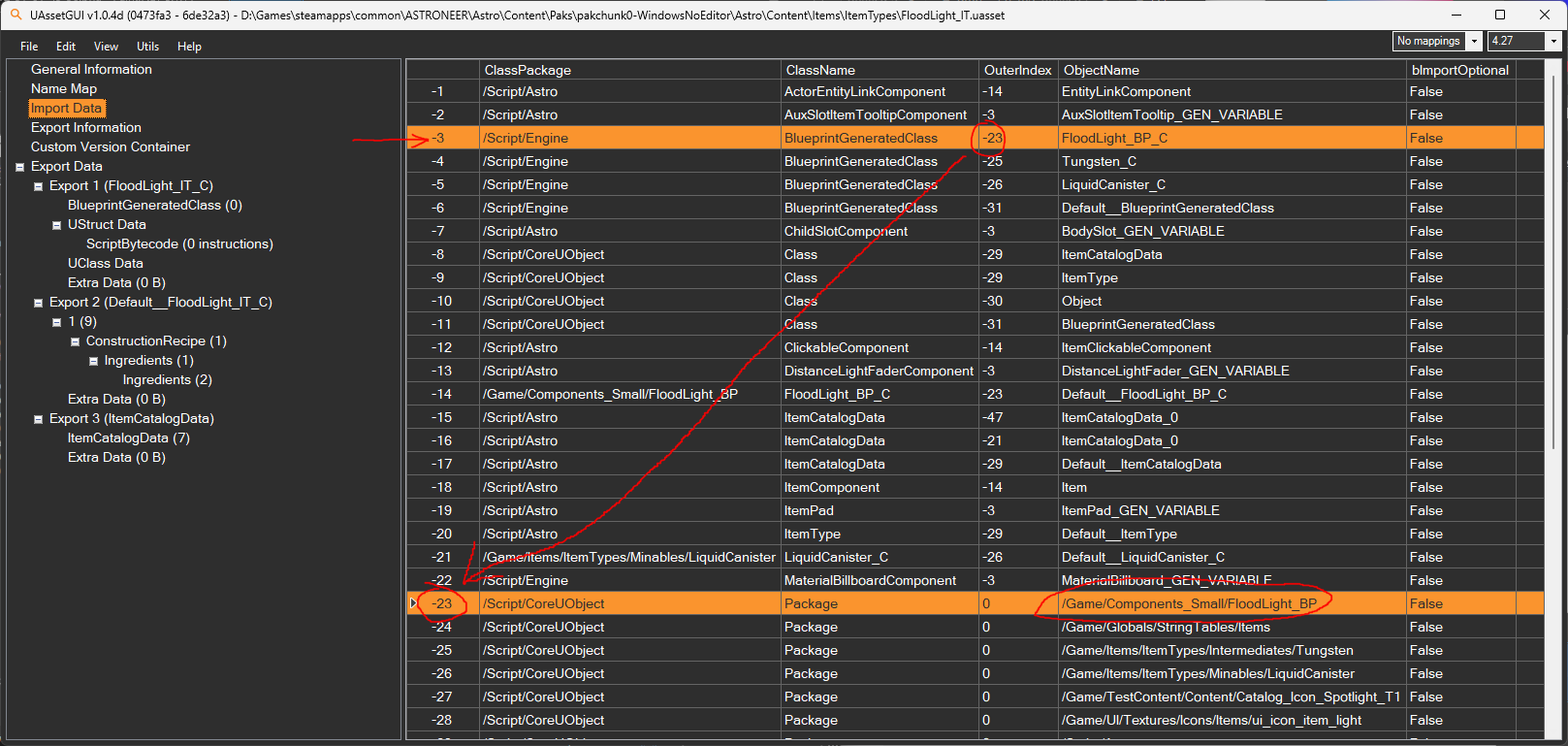
Given an ObjectProperty within an asset, examine the asset’s Import Map to find the import that the ObjectProperty points to (defined by a negative number in the property’s “Variant” field). Then, follow that import’s OuterIndex, which points to another import. That import will then have the path to the corresponding asset under the ObjectName column.
See the images provided below for a visual guide on how to follow an import, using the FloodLight item type as an example. In this case, the ItemType at /Game/Items/ItemTypes/FloodLight_IT corresponds to the PhysicalItem at /Game/Components_Small/FloodLight_BP.
I want to modify a specific item, but I can’t find its ItemType asset!
One of the most common ways to find a specific asset is to search for a specific string that is expected to occur within the asset using grep or Windows findstr.
For example, navigating to the Astro\Content\Items\ItemTypes directory and executing findstr /S /I /M /C:"jetpack" *.uasset on the Windows command line will return the paths of every file within the current directory containing the string “jetpack”, recursively, including the paths to the item type assets for both the Hydrazine Jetpack and the Solid-Fuel Jump Jet.
You may wish to alternatively refer to the lookup table that was generated below using UAssetAPI on January 1st, 2026, which contains the English name of every item in the game paired with the path on disk to its ItemType asset. The relevant source code that was used to generate the lookup table is also provided for those who are interested.
LookupTableIT.json
{
  "\"Bestefar\"": "/Game/Items/Snails/TerrariumSnail_Glacio_IT",
  "\"Enoki\"": "/Game/Items/Snails/TerrariumSnail_Atrox_IT",
  "\"Princess\"": "/Game/Items/Snails/TerrariumSnail_Vesania_IT",
  "\"Rogal\"": "/Game/Items/Snails/TerrariumSnail_Novus_IT",
  "\"Stilgar\"": "/Game/Items/Snails/TerrariumSnail_Calidor_IT",
  "\"Sylvie\"": "/Game/Items/Snails/TerrariumSnail_Sylva_IT",
  "\"Usagi\"": "/Game/Items/Snails/TerrariumSnail_Desolo_IT",
  "“Misplaced” Cargo": "/Game/Items/ItemTypes/Events/EXO_Cares/ItemType_Wrecked_HazardousContainer_A",
  "[[/-&>++/\\": "/Game/Items/ItemTypes/Missions/RiftAnchor_RailsA_IT",
  "[]0]\\ ==~|}/! ]{ \\": "/Game/Items/ItemTypes/Missions/RiftAnchor_RailsC_IT",
  "{(}]]~]]&/-% %/~^#)": "/Game/Items/ItemTypes/Missions/RiftAnchor_RailsB_IT",
  "{*^]<}/?@(!]]": "/Game/Items/Snails/MissionItems/Snails_RiftAnchor_IT",
  "</-/4|\\|4>": "/Game/Scenarios/Limited/2024_LTE_Spring/Spring_EventItem1_IT",
  "Aeoluz": [
    "/Game/U32_Expansion/Planets/GlitchPlanet/GlitchPlanet_IT",
    "/Game/Items/ItemTypes/Intangibles/Planets/Aeoluz"
  ],
  "Aero": "/Game/Items/ItemTypes/CreativeDroneIT",
  "Alignment Mod": "/Game/Items/ItemTypes/Components/Augment_FixedAlignment",
  "Alpha Gateway Terminal Access Slot": "/Game/U32_Expansion/Puzzles/CounterhackKeyhole_BASE_IT",
  "Alpha Rootkit": "/Game/U32_Expansion/Items/RootKit/GW_RootKit_Base_IT",
  "Alpha Shard": "/Game/U32_Expansion/ProceduralGenerationAssets/PlacementActors/Gateways/ChamberRepair_Fragment_Base_IT",
  "Alpha Storm Data": "/Game/U32_Expansion/Items/Resources/ResourceNugget_StormData_01_IT",
  "Alpha Vault": [
    "/Game/U32_Expansion/Puzzles/RootAccessVaultComplete_BASE_IT",
    "/Game/U32_Expansion/Puzzles/RootAccessVault_BASE_IT"
  ],
  "Alpha Vault Key": "/Game/U32_Expansion/Puzzles/VaultPartBase_IT",
  "Aluminum": "/Game/Items/ItemTypes/Intermediates/Aluminum",
  "Aluminum Alloy": "/Game/Items/ItemTypes/Composites/AluminumAlloy",
  "Amaize Seed": "/Game/Scenarios/Limited/2024_LTE_Fall/Fall_2024_Seed_Resipound_IT",
  "Ammonium": "/Game/Items/ItemTypes/Minables/Ammonium",
  "Arctichoke Seed": "/Game/U36_Expansion/Items/Seeds/ItemType_Seed_Harvestable_Artichoke",
  "Argon": "/Game/Items/ItemTypes/Gases/Argon",
  "Asteroid": [
    "/Game/U36_Expansion/Planets/OrbitalPlatformMiniPlanet/IT_MiniPlanet_Asteroid",
    "/Game/U36_Expansion/Planets/OrbitalPlatformMiniPlanet/IT_MiniPlanet_Asteroid_02"
  ],
  "Asteroid Field": "/Game/U36_Expansion/Planets/OrbitalPlatformMiniPlanet/IT_MiniPlanet_AsteroidField",
  "Astral Figurine": "/Game/Items/ItemTypes/Limited/Holiday/Holiday_Figurine1_IT",
  "Astronium": "/Game/Items/ItemTypes/Minables/Astronium",
  "Atmospheric Condenser": "/Game/Items/ItemTypes/Components/AtmosphericCondenser",
  "Atrox": "/Game/Items/ItemTypes/Intangibles/Planets/Radiated",
  "Attactus Sample": "/Game/Items/ItemTypes/Researchables/Hazards/ItemType_Researchable_Shooter_02",
  "Attapetrol": "/Game/Scenarios/Limited/2020_LTE_Halloween/ItemDrive_Resource2_2020_LTE_Halloween",
  "Auto Arm": "/Game/Items/ItemTypes/Components/AutoCraneMedium_IT",
  "Auto Extractor": "/Game/Items/ItemTypes/Components/ResourceExtractorLarge_IT",
  "Auto-Fertilizer": "/Game/U36_Expansion/PROTO_ASSETS/Biodome/IT_Biodome_Fertiliser",
  "Auto-Harvester": "/Game/U36_Expansion/PROTO_ASSETS/Biodome/IT_Biodome_Harvester",
  "Auto-Planter": "/Game/U36_Expansion/PROTO_ASSETS/Biodome/IT_Biodome_SeedLauncher",
  "Automaton 001": "/Game/Items/ItemTypes/HolidayLTE_2019/Holiday_Robot1_IT",
  "Automaton 002": "/Game/Items/ItemTypes/HolidayLTE_2019/Holiday_Robot2_IT",
  "Automaton 009": "/Game/Scenarios/Limited/2024_LTE_Anniversary/Anniversary_Item7_IT",
  "Backpack Printer Plinth": "/Game/Items/ItemTypes/Components/CheatPlinthBackpackPrinter",
  "Battery Sensor": "/Game/Items/ItemTypes/Actuators/Actuator_Battery_IT",
  "Beach Ball": "/Game/Items/ItemTypes/Components/Object_Ball_Beach_LargeB_IT",
  "Beacon": "/Game/Items/ItemTypes/Components/Beacon",
  "Biodome": "/Game/U36_Expansion/PROTO_ASSETS/Biodome/IT_MS_Biodome",
  "Biodome Expansion": [
    "/Game/U36_Expansion/PROTO_ASSETS/Biodome/IT_Biodome_Expansion",
    "/Game/U36_Expansion/PROTO_ASSETS/Biodome/IT_Biodome_ExpansionSlotIndicator"
  ],
  "Blue Firework": "/Game/Items/ItemTypes/Fireworks/ItemType_Firework_Rocket_Base_Blue",
  "Boost Mod": "/Game/Items/ItemTypes/Components/Augment_PerformanceBoost",
  "Bouncevine Seed": "/Game/Items/ItemTypes/Seeds/ItemType_Seed_Bouncer_Vines_01",
  "Bubbulb Seed": "/Game/U36_Expansion/Items/Seeds/ItemType_Seed_Harvestable_Bubbulb",
  "Buggy": "/Game/Items/ItemTypes/Components/RoverT2",
  "Burn Book": "/Game/U32_Expansion/Items/LynLogs/LynLog1_IT",
  "Burrito?": "/Game/Scenarios/Limited/2024_LTE_Anniversary/Anniversary_Item5_IT",
  "Button Repeater": "/Game/Items/ItemTypes/Actuators/Actuator_Button_IT",
  "C.O.L.E.": [
    "/Game/Vehicles/Rails/PackagedItem_T2_RailCar_EnginePersonal_IT",
    "/Game/Vehicles/Rails/RailCar_Engine_Personal_ItemType"
  ],
  "Cable Splitter": "/Game/Items/ItemTypes/Components/Transformer_Tier1",
  "Cactile Seed": "/Game/Items/ItemTypes/Seeds/ItemType_Seed_Tappable_Arid_Cactus_a",
  "Calidor": "/Game/Items/ItemTypes/Intangibles/Planets/Arid",
  "Carbon": "/Game/Items/ItemTypes/Intermediates/Carbon",
  "Cassiterite": "/Game/Items/ItemTypes/Minables/Cassiterite",
  "Cauldrangea Roots": [
    "/Game/Scenarios/Limited/2020_LTE_Halloween/Platform_2020_LTE_Halloween_T3x1_P4_ColorVar0_IT",
    "/Game/Scenarios/Limited/2020_LTE_Halloween/Platform_2020_LTE_Halloween_T3x1_P4_IT",
    "/Game/Scenarios/Limited/2021_LTE_Halloween/Platform_2021_LTE_Halloween_T3x1_P4_ColorVar1_IT",
    "/Game/Scenarios/Limited/2021_LTE_Halloween/Platform_2021_LTE_Halloween_T3x1_P4_ColorVar2_IT"
  ],
  "Ceramic": "/Game/Items/ItemTypes/Intermediates/Ceramic",
  "Chemistry Lab": "/Game/Items/ItemTypes/Components/ResourceCombiner_IT",
  "Clay": "/Game/Items/ItemTypes/Minables/Clay",
  "Coal": "/Game/Items/ItemTypes/Minables/Coal",
  "Compound": [
    "/Game/Items/ItemTypes/Minables/Compound",
    "/Game/U36_Expansion/Planets/OrbitalPlatformMiniPlanet/IT_MiniPlanet_Compound"
  ],
  "Conepod Seed": "/Game/U36_Expansion/Items/Seeds/ItemType_Seed_Harvestable_Conepod",
  "Construction Anchor Landing Pad": "/Game/U36_Expansion/PROTO_ASSETS/Wreck/IT_MS_AnchorLandingPad",
  "Copper": "/Game/Items/ItemTypes/Intermediates/Copper",
  "Cosmic Automaton": "/Game/Scenarios/Limited/2024_LTE_Anniversary/Anniversary_Item1_IT",
  "Cosmic Bauble": "/Game/Items/ItemTypes/Limited/Holiday/Holiday_Bauble1_IT",
  "Cosmic Squash": "/Game/Scenarios/Limited/2024_LTE_Anniversary/Anniversary_Item3_IT",
  "Count Repeater": "/Game/Items/ItemTypes/Actuators/Actuator_Counter_IT",
  "Counterhack Key Alpha": "/Game/U32_Expansion/Items/CounterHackKey/GW_CounterHackKey_Base_IT",
  "Crane": "/Game/Items/ItemTypes/Components/Crane_Large",
  "Crumbling Stone": "/Game/Items/ItemTypes/Destructibles/Destructible_PlacementActor_BoulderStone_IT",
  "Cubic Object": "/Game/Items/ItemTypes/HolidayLTE_2019/Holiday_Block1_IT",
  "Curious Item": "/Game/Items/ItemTypes/Collectibles/Skybreaker_IT",
  "Curious Sturdysquash": "/Game/Scenarios/Limited/Pumpkins/Pumpkin_Offspring_01_ColorVar4_IT",
  "Daggeroot Seed": "/Game/Items/ItemTypes/Seeds/ItemType_Seed_Spiker_01",
  "Data Circuit Model A 1/5": "/Game/Scenarios/Limited/2024_LTE_Anniversary/Anniversary_Lore1_IT",
  "Debris Bundle": "/Game/Items/ItemTypes/Components/DebrisBundle-ItemType",
  "Delay Repeater": "/Game/Items/ItemTypes/Actuators/Actuator_Timer_IT",
  "Delta Storm Data": "/Game/U32_Expansion/Items/Resources/ResourceNugget_StormData_02_IT",
  "Desolo": "/Game/Items/ItemTypes/Intangibles/Planets/Barren",
  "Dewtrunk Seed": "/Game/U36_Expansion/Items/Seeds/ItemType_Seed_Harvestable_Dewtrunk",
  "Diamond": "/Game/Items/ItemTypes/Composites/Diamond",
  "Display Case": [
    "/Game/U36_Expansion/MegaStructures/Museum/IT_MuseumDisplayCaseShelf_T1",
    "/Game/U36_Expansion/MegaStructures/Museum/IT_MuseumDisplayCaseShelf_T2"
  ],
  "Display Case Platform": "/Game/U36_Expansion/MegaStructures/Museum/IT_MuseumDisplayCase",
  "Distribution Launcher System (DLS) ": "/Game/U36_Expansion/PROTO_ASSETS/Wreck/IT_MS_Wreck",
  "DLS Construction Anchor": "/Game/U36_Expansion/MegaStructures/Anchor/IT_MS_Anchor",
  "Donut": "/Game/U36_Expansion/Planets/OrbitalPlatformMiniPlanet/IT_MiniPlanet_Torus",
  "Drill Head": "/Game/Items/ItemTypes/Components/DrillHead",
  "Drill Mod 1": "/Game/Items/ItemTypes/Components/Augment_HardTerrain_1",
  "Drill Mod 2": "/Game/Items/ItemTypes/Components/Augment_HardTerrain_2",
  "Drill Mod 3": "/Game/Items/ItemTypes/Components/Augment_HardTerrain_3",
  "Drill Strength 1": "/Game/Items/ItemTypes/Components/DrillHead_T2_Strength_1",
  "Drill Strength 2": "/Game/Items/ItemTypes/Components/DrillHead_T2_Strength_2",
  "Drill Strength 3": "/Game/Items/ItemTypes/Components/DrillHead_T2_Strength_3",
  "Dropship": "/Game/Items/ItemTypes/Components/Dropship_IT",
  "Dynamite": "/Game/Items/ItemTypes/Components/Dynamite",
  "Empty Terrarium": [
    "/Game/Items/Snails/MissionItems/TerrariumEmpty_Atrox_IT",
    "/Game/Items/Snails/MissionItems/TerrariumEmpty_Calidor_IT",
    "/Game/Items/Snails/MissionItems/TerrariumEmpty_Desolo_IT",
    "/Game/Items/Snails/MissionItems/TerrariumEmpty_Glacio_IT",
    "/Game/Items/Snails/MissionItems/TerrariumEmpty_Novus_IT",
    "/Game/Items/Snails/MissionItems/TerrariumEmpty_Sylva_IT",
    "/Game/Items/Snails/MissionItems/TerrariumEmpty_Vesania_IT"
  ],
  "EVA": [
    "/Game/Items/Snails/TerrariumFox_EvaCM_IT",
    "/Game/Items/Snails/TerrariumFox_Eva_IT"
  ],
  "EXO Cache": [
    "/Game/Items/ItemTypes/Destructibles/Destructible_PlacementActor_DataCache_EXOChip_IT",
    "/Game/Scenarios/Limited/2024_LTE_Anniversary/PlacementObjects/DataCaches/Destructible_PlacementActor_ALTE_DataCache_IT"
  ],
  "EXO Chip": "/Game/Items/ItemTypes/Collectibles/EXO_Chip_IT",
  "EXO Dynamics Research Aid": [
    "/Game/Items/ItemTypes/Puzzles/ItemType_Puzzlebox_Base_Consume",
    "/Game/Items/ItemTypes/Puzzles/ItemType_Puzzlebox_Base_PowerLimit",
    "/Game/Items/ItemTypes/Puzzles/ItemType_Puzzlebox_Base_PowerMax"
  ],
  "EXO Request Platform": "/Game/Items/ItemTypes/Components/ItemType_ExoRequestModule",
  "Explosive Powder": "/Game/Items/ItemTypes/Composites/ExplosivePowder",
  "Extra Large Curved Platform": "/Game/Items/ItemTypes/Components/platfrom_curve_t3x2_t2x1_P4_IT",
  "Extra Large Platform A": "/Game/Items/ItemTypes/Components/Platform_Standard_T4x1_P8",
  "Extra Large Platform B": "/Game/Items/ItemTypes/Components/Platform_Standard_T2x10_P4",
  "Extra Large Platform C": "/Game/Items/ItemTypes/Components/Platform_Standard_T4x1_T3x2_P4",
  "Extra Large Resource Canister": "/Game/Items/ItemTypes/Components/ExtraLargeResourceCanister_IT",
  "Extra Large Shredder": "/Game/Items/ItemTypes/Components/Shredder_T4",
  "Extra Large Storage": "/Game/Items/ItemTypes/Components/StorageRack_XL",
  "Fault Finder": [
    "/Game/Items/FaultFinder/FaultFinder_Align_IT",
    "/Game/Items/FaultFinder/FaultFinder_Full_Align_IT"
  ],
  "Field Shelter": "/Game/Items/ItemTypes/Components/Shelter_T2_IT",
  "Figurine Platform": "/Game/Items/ItemTypes/Components/Platform_Standard_T1x64",
  "Finwheel Seed": "/Game/U36_Expansion/Items/Seeds/ItemType_Seed_Harvestable_FinWheel",
  "Fireworks": [
    "/Game/Items/ItemTypes/Fireworks",
    "/Game/U36_Expansion/Items/Missions/IT_Firework_FinalReward"
  ],
  "Flat Platform": "/Game/U36_Expansion/Planets/OrbitalPlatformMiniPlanet/IT_MiniPlanet_FlatBox",
  "Floodlight": "/Game/Items/ItemTypes/FloodLight_IT",
  "Fractal Rose Seed": "/Game/Items/ItemTypes/Seeds/ItemType_Seed_FractalRose",
  "Fuel Condenser": "/Game/Items/ItemTypes/Components/Condenser",
  "Geometric Triptych": [
    "/Game/Items/ItemTypes/GateTech/GatewayKey",
    "/Game/Items/ItemTypes/GateTech/GatewayKey_Arid",
    "/Game/Items/ItemTypes/GateTech/GatewayKey_Exotic",
    "/Game/Items/ItemTypes/GateTech/GatewayKey_ExoticMoon",
    "/Game/Items/ItemTypes/GateTech/GatewayKey_Radiated",
    "/Game/Items/ItemTypes/GateTech/GatewayKey_Terran",
    "/Game/Items/ItemTypes/GateTech/GatewayKey_TerranMoon",
    "/Game/Items/ItemTypes/GateTech/GatewayKey_Tundra"
  ],
  "Geothermal": "/Game/Items/ItemTypes/Components/Geothermal",
  "Glacio": "/Game/Items/ItemTypes/Intangibles/Planets/Tundra",
  "Glass": "/Game/Items/ItemTypes/Intermediates/Glass",
  "Glitch Portal": "/Game/GlitchwalkerPortal_IT",
  "Glitch Portal Anchor": "/Game/U32_Expansion/Items/PortalSpawner/GlitchwalkerPortalSpawner_IT",
  "Glitch Shelter": [
    "/Game/U32_Expansion/Items/GlitchShelter/GlitchShelter_T4_Starter_Cosmetic_IT",
    "/Game/U32_Expansion/Items/GlitchShelter/GlitchShelter_T4_Starter_IT"
  ],
  "Glowstick": "/Game/Items/ItemTypes/Components/ItemType_Glowstick_Single",
  "Glowsticks": "/Game/Items/ItemTypes/Components/ItemType_Glowstick_Bundle",
  "Graphene": "/Game/Items/ItemTypes/Composites/Graphene",
  "Graphene Alloy": "/Game/Items/ItemTypes/Composites/GrapheneAlloy",
  "Graphite": "/Game/Items/ItemTypes/Minables/Graphite",
  "Gravity Globe": "/Game/Vehicles/GravitySphere/GravitySphere_Large_IT",
  "Green Firework": "/Game/Items/ItemTypes/Fireworks/ItemType_Firework_Rocket_Base_Green",
  "Helium": "/Game/Items/ItemTypes/Gases/Helium",
  "Helmet Lava Lamp": "/Game/U36_Expansion/Items/Decorations/LavaLamp/IT_Deco_LavaLamp_Helmet",
  "Hematite": "/Game/Items/ItemTypes/Minables/Hematite",
  "Holographic Figurine": "/Game/Items/ItemTypes/Collectibles/EXO_Chesspiece_IT",
  "Honeypot Seed": "/Game/Items/ItemTypes/Seeds/ItemType_Seed_Tappable_Radiated_Tree_a",
  "Hornstalk Seed": "/Game/U36_Expansion/Items/Seeds/ItemType_Seed_Harvestable_HornStalk",
  "Hoverboard": "/Game/Vehicles/Hoverboard_IT",
  "Hubble Space Telescope": "/Game/Items/ItemTypes/WandererProbes/WandererProbe_HST",
  "Hybrid Rose Seed": "/Game/Items/ItemTypes/Seeds/ItemType_Seed_SuperRose",
  "Hydrazine": [
    "/Game/Items/ItemTypes/Intermediates/Fuel",
    "/Game/Items/ItemTypes/Intermediates/FuelStored"
  ],
  "Hydrazine Catalyzer": "/Game/Items/ItemTypes/Components/CrystalRefinery",
  "Hydrazine Jet Pack": "/Game/Items/ItemTypes/Components/HydrazineJetpack_IT",
  "Hydrazine Thruster": "/Game/Items/ItemTypes/Components/Thruster",
  "Hydrogen": "/Game/Items/ItemTypes/Gases/Hydrogen",
  "Ice Chunk": "/Game/Items/ItemTypes/Destructibles/Destructible_PlacementActor_BoulderIce_IT",
  "Icon Sign": "/Game/U36_Expansion/Items/IconSignPost/IT_IconSignPost",
  "Ingredient Plinth": "/Game/Items/ItemTypes/Components/IngredientPlinth",
  "Inhibitor Mod": "/Game/Items/ItemTypes/Components/Augment_Inhibitor",
  "Intermodal Terminal": "/Game/U36_Expansion/MegaStructures/Logistics_Complex/IT_LogisticsComplex",
  "Iron": "/Game/Items/ItemTypes/Intermediates/Iron",
  "Jasper Bishop": "/Game/Items/ItemTypes/Collectibles/World_Chesspiece_Bishop02_IT",
  "Jasper King": "/Game/Items/ItemTypes/Collectibles/World_Chesspiece_King02_IT",
  "Jasper Knight": "/Game/Items/ItemTypes/Collectibles/World_Chesspiece_Knight02_IT",
  "Jasper Pawn": "/Game/Items/ItemTypes/Collectibles/World_Chesspiece_Pawn02_IT",
  "Jasper Queen": "/Game/Items/ItemTypes/Collectibles/World_Chesspiece_Queen02_IT",
  "Jasper Rook": "/Game/Items/ItemTypes/Collectibles/World_Chesspiece_Rook02_IT",
  "Kepler Space Telescope": "/Game/Items/ItemTypes/WandererProbes/WandererProbe_KST",
  "Knobbly Sturdysquash": "/Game/Scenarios/Limited/Pumpkins/Pumpkin_Mega_IT",
  "Landing Pad": "/Game/Items/ItemTypes/Components/DeployableLandingPad",
  "Lapis Bishop": "/Game/Items/ItemTypes/Collectibles/World_Chesspiece_Bishop01_IT",
  "Lapis King": "/Game/Items/ItemTypes/Collectibles/World_Chesspiece_King01_IT",
  "Lapis Knight": "/Game/Items/ItemTypes/Collectibles/World_Chesspiece_Knight01_IT",
  "Lapis Pawn": "/Game/Items/ItemTypes/Collectibles/World_Chesspiece_Pawn01_IT",
  "Lapis Queen": "/Game/Items/ItemTypes/Collectibles/World_Chesspiece_Queen01_IT",
  "Lapis Rook": "/Game/Items/ItemTypes/Collectibles/World_Chesspiece_Rook01_IT",
  "Large Active Storage": "/Game/Items/ItemTypes/Components/Storage_rack_T2_T1x15_a1x16_IT",
  "Large Battery": "/Game/Items/ItemTypes/Components/Battery_RealLarge",
  "Large Canister Ingredient Plinth": "/Game/Items/ItemTypes/Components/LargeResourceCanisterPlinth_IT",
  "Large Curved Platform": "/Game/Items/ItemTypes/Components/Platfrom_Curve_T3x1P4_IT",
  "Large Extended Platform": "/Game/Items/ItemTypes/Components/Platform_Long_T2x2_P6_IT",
  "Large Fluid & Soil Canister": [
    "/Game/Items/ItemTypes/Components/LiquidCanister_Fixed_T3_IT",
    "/Game/Items/ItemTypes/Components/LiquidCanister_T3_IT"
  ],
  "Large Fog Horn": "/Game/Items/ItemTypes/Components/Horn_T3-01_IT",
  "Large Gas Canister": "/Game/Items/ItemTypes/Components/LargeGasCanister_IT",
  "Large Platform A": "/Game/Items/ItemTypes/Components/Platform_Standard_T3x1_P4",
  "Large Platform B": [
    "/Game/Items/ItemTypes/Components/Breadboard_Tier3",
    "/Game/Items/ItemTypes/POI_Elements/ItemType_SemiWrecked_T3_Platform_Base"
  ],
  "Large Platform C": "/Game/Items/ItemTypes/Components/Platform_Standard_T3x1_T1x20_P4",
  "Large Print Filter": "/Game/Items/ItemTypes/Components/PrinterCatagoryFilter_Plinth_T3_IT",
  "Large Printer": "/Game/Items/ItemTypes/Components/BreadboardPrinter_T3",
  "Large Printer Plinth": "/Game/Items/ItemTypes/Components/CheatPlinthT3Printer",
  "Large Resource Canister": "/Game/Items/ItemTypes/Components/LargeResourceCanister_IT",
  "Large Rover": "/Game/Items/ItemTypes/Components/Rover_XL",
  "Large Rover Seat": "/Game/Items/ItemTypes/Components/Seat_Large",
  "Large Rover Seat B": "/Game/Items/ItemTypes/Components/Seat_Large_B",
  "Large Sensor Hoop A": "/Game/Items/ItemTypes/Components/Platform_Ring_t1x6_p2",
  "Large Sensor Hoop B": "/Game/Items/ItemTypes/Components/Platform_Ring_t1x6_p4",
  "Large Sensor Ring": "/Game/Items/ItemTypes/Components/Storage_Ring_T2_T1x6",
  "Large Shredder": "/Game/Items/ItemTypes/Components/Shredder_T3",
  "Large Shuttle": "/Game/Items/ItemTypes/Components/Shuttle_Large",
  "Large Shuttle Seat": "/Game/Items/ItemTypes/Components/Seat_Large_SS",
  "Large Solar Panel": "/Game/Items/ItemTypes/Solar_Large_IT",
  "Large Stacked Platform": "/Game/Items/ItemTypes/Components/Platform_Standard_T3x1x2_IT",
  "Large Starship Horn": "/Game/Items/ItemTypes/Components/Horn_T3-02_IT",
  "Large Storage": "/Game/Items/ItemTypes/Components/StorageRack_Large",
  "Large Storage Silo A": "/Game/Items/ItemTypes/Components/Storage_Tall_T3_T2x8_IT",
  "Large Storage Silo B": "/Game/Items/ItemTypes/Components/Storage_Tall_T3_T2x12_IT",
  "Large T-Platform": "/Game/Items/ItemTypes/Components/Platform_T_T3x2_IT",
  "Large Wind Turbine": "/Game/Items/ItemTypes/Components/Wind_Large_IT",
  "Lashleaf Seed": "/Game/Items/ItemTypes/Seeds/ItemType_Seed_Bouncer_Tongue_01",
  "Laterite": "/Game/Items/ItemTypes/Minables/Laterite",
  "Lava Lamp": "/Game/U36_Expansion/Items/Decorations/LavaLamp/IT_Deco_LavaLamp",
  "Leek": "/Game/Scenarios/Limited/2024_LTE_Anniversary/Anniversary_Ingredient2_IT",
  "Leisurely Cauldrangea": "/Game/Scenarios/Limited/2020_LTE_Halloween/ItemConverter_2020_LTE_Halloween_IT",
  "Leveling Block": "/Game/Items/ItemTypes/Components/LevelingBlock",
  "Lithium": "/Game/Items/ItemTypes/Minables/Lithium",
  "Logistics Depot: Calidor": "/Game/Items/ItemTypes/Missions/RailDepotB_IT",
  "Logistics Depot: Glacio": "/Game/Items/ItemTypes/Missions/RailDepotA_IT",
  "Logistics Depot: Sylva": "/Game/Items/ItemTypes/Missions/RailDepotC_IT",
  "LRD Zebra": "/Game/Items/ItemTypes/ItemType_ZebraBall",
  "Malachite": "/Game/Items/ItemTypes/Minables/Malachite",
  "Mariner X Probe": "/Game/Items/ItemTypes/WandererProbes/WandererProbe_MX",
  "MAT": [
    "/Game/Items/ItemTypes/Puzzles/PuzzleCommTower_Request_BASE_IT",
    "/Game/Items/ItemTypes/Puzzles/PuzzleCommTower_Request_MissionA_IT",
    "/Game/Items/ItemTypes/Puzzles/PuzzleCommTower_Request_MissionB_IT"
  ],
  "Medium Battery": "/Game/Items/ItemTypes/Components/Battery_Large",
  "Medium Buggy Horn": "/Game/Items/ItemTypes/Components/Horn_T2-01_IT",
  "Medium Canister Ingredient Plinth": "/Game/Items/ItemTypes/Components/MediumResourceCanisterPlinth_IT",
  "Medium Fluid & Soil Canister": "/Game/Items/ItemTypes/Components/LiquidCanister_T2_IT",
  "Medium Gas Canister": "/Game/Items/ItemTypes/Components/MediumGasCanister_IT",
  "Medium Generator": "/Game/Items/ItemTypes/Components/Generator",
  "Medium Platform A": "/Game/Items/ItemTypes/Components/Platform_Standard_T2x1_P4",
  "Medium Platform B": "/Game/Items/ItemTypes/Components/Breadboard_Tier2",
  "Medium Platform C": "/Game/Items/ItemTypes/Components/Platform_Standard_T2x1_P3_IT",
  "Medium Print Filter": "/Game/Items/ItemTypes/Components/PrinterCatagoryFilter_Plinth_T2_IT",
  "Medium Printer": "/Game/Items/ItemTypes/Components/BreadboardPrinter_T2",
  "Medium Printer Plinth": "/Game/Items/ItemTypes/Components/CheatPlinthT2Printer",
  "Medium Resource Canister": "/Game/Items/ItemTypes/Components/MediumResourceCanister_IT",
  "Medium Rover": "/Game/Items/ItemTypes/Components/Rover_Large",
  "Medium Sensor Arch": "/Game/Items/ItemTypes/Components/Platform_Arch_t1x6_IT",
  "Medium Shredder": "/Game/Items/ItemTypes/Components/Shredder_T2",
  "Medium Shuttle": "/Game/Items/ItemTypes/Components/Shuttle",
  "Medium Solar Panel": "/Game/Items/ItemTypes/Components/Solar_Medium",
  "Medium Stacked Platform": "/Game/Items/ItemTypes/Components/Platform_Standard_T2x1x2_IT",
  "Medium Storage": "/Game/Items/ItemTypes/Components/StorageRack_Medium",
  "Medium Storage Silo": "/Game/Items/ItemTypes/Components/Storage_Tall_T2_T1x24_IT",
  "Medium T-Platform": "/Game/Items/ItemTypes/Components/Platform_T_T2x2_IT",
  "Medium Truck Horn": "/Game/Items/ItemTypes/Components/Horn_T2-02_IT",
  "Medium Wind Turbine": "/Game/Items/ItemTypes/Components/Wind_Medium",
  "Mega-Arctichoke Seed": "/Game/U36_Expansion/Items/Seeds/MegaSeeds/ItemType_Seed_Harvestable_Artichoke_Mega",
  "Mega-Bubbulb Seed": "/Game/U36_Expansion/Items/Seeds/MegaSeeds/ItemType_Seed_Harvestable_Bubbulb_Mega",
  "Mega-Conepod Seed": "/Game/U36_Expansion/Items/Seeds/MegaSeeds/ItemType_Seed_Harvestable_Conepod_Mega",
  "Mega-Deconstructor": "/Game/U36_Expansion/Items/Megadeconstructor/IT_MegastructureDeconstructor",
  "Mega-Dewtrunk Seed": "/Game/U36_Expansion/Items/Seeds/MegaSeeds/ItemType_Seed_Harvestable_Dewtrunk_Mega",
  "Mega-Finwheel Seed": "/Game/U36_Expansion/Items/Seeds/MegaSeeds/ItemType_Seed_Harvestable_FinWheel_Mega",
  "Mega-Hornstalk Seed": "/Game/U36_Expansion/Items/Seeds/MegaSeeds/ItemType_Seed_Harvestable_HornStalk_Mega",
  "Mega-Mini Asteroid Simulator Control Panel": "/Game/U36_Expansion/MegaStructures/OrbitalPlatform/ControlPanels/IT_MiniPlanetSelector",
  "Mega-Mini Training Shuttle": "/Game/U36_Expansion/Items/Shuttle/IT_PersonalBeepyShuttle",
  "Mega-Nubcap Seed": "/Game/U36_Expansion/Items/Seeds/MegaSeeds/ItemType_Seed_Harvestable_Nubcap_Mega",
  "Mega-Oxygenator": "/Game/U36_Expansion/PROTO_ASSETS/Biodome/IT_Biodome_OxygenExtractor",
  "Mega-Printer Drone": "/Game/U36_Expansion/MegaStructures/Anchor/IT_MS_Anchor_DronePrinter",
  "Mega-Printer Platform": "/Game/U36_Expansion/MegaStructures/Anchor/IT_MS_Anchor_BuildingPlatform",
  "Mega-Terrain Platform": "/Game/U36_Expansion/MegaStructures/OrbitalPlatform/IT_OrbitalPlatform_TrueFlatPlatform",
  "Megastructure Component Printer": "/Game/U36_Expansion/MegaStructures/Vending_Machine/IT_VendingMachine",
  "Melodic Mushroom": "/Game/U36_Expansion/Items/MusicalMushroom/IT_MusicalMushroom",
  "Methane": "/Game/Items/ItemTypes/Gases/Methane",
  "Mineral Extractor": "/Game/Items/ItemTypes/Components/SedimentFilter",
  "Model Planet": "/Game/U36_Expansion/Items/Decorations/globes/IT_Deco_ModelPlanet",
  "Museum": "/Game/U36_Expansion/MegaStructures/Museum/IT_Museum",
  "Mutant Boomalloon Seed": "/Game/Items/ItemTypes/Seeds/ItemType_Seed_Harmless_ProxPopper",
  "Mutant Elegant Spewflower Seed": "/Game/Items/ItemTypes/Seeds/ItemType_Seed_Harmless_Spewer02",
  "Mutant Hissbine Seed": "/Game/Items/ItemTypes/Seeds/ItemType_Seed_Harmless_Gasbag",
  "Mutant Noxious Cataplant Seed": "/Game/Items/ItemTypes/Seeds/ItemType_Seed_Harmless_Lobber",
  "Mutant Noxious Spewflower Seed": "/Game/Items/ItemTypes/Seeds/ItemType_Seed_Harmless_Spewer01",
  "Mutant Spiny Attactus Seed": "/Game/Items/ItemTypes/Seeds/ItemType_Seed_Harmless_Shooter",
  "Mutant Volatile Attactus Seed": "/Game/Items/ItemTypes/Seeds/ItemType_Seed_Harmless_ExplodeShooter",
  "Mutant Volatile Cataplant Seed": "/Game/Items/ItemTypes/Seeds/ItemType_Seed_Harmless_ExplodeLobber",
  "Nanocarbon Alloy": "/Game/Items/ItemTypes/Composites/NanoCarbonAlloy",
  "Narrow Mod": "/Game/Items/ItemTypes/Components/Augment_PrecisionBrush",
  "New Horizons Probe": "/Game/Items/ItemTypes/WandererProbes/WandererProbe_NH",
  "Nitrogen": "/Game/Items/ItemTypes/Gases/Nitrogen",
  "Novus": "/Game/Items/ItemTypes/Intangibles/Planets/Exotic_Moon_IT",
  "Noxomaton 002": "/Game/Scenarios/Limited/2024_LTE_Anniversary/Anniversary_Item4_IT",
  "Noxothane": "/Game/Scenarios/Limited/2020_LTE_Halloween/ItemDrive_Resource3_2020_LTE_Halloween",
  "Nubcap Seed": "/Game/U36_Expansion/Items/Seeds/ItemType_Seed_Harvestable_Nubcap",
  "Omnugget": "/Game/Scenarios/Limited/2024_LTE_Anniversary/Anniversary_Item6_IT",
  "Orange Firework": "/Game/Items/ItemTypes/Fireworks/ItemType_Firework_Rocket_Base_Orange",
  "Orbital Platform": "/Game/U36_Expansion/Items/TEMP/IT_OPSpawner",
  "Orbital Platform Launch Tube": "/Game/U36_Expansion/PROTO_ASSETS/Wreck/IT_MS_WreckOPDoor",
  "Orbital Platform Stage 1 Package": "/Game/U36_Expansion/MegaStructures/OrbitalPlatform/IT_OrbitalPlatform_Package1",
  "Orbital Platform Stage 2 Package": "/Game/U36_Expansion/MegaStructures/OrbitalPlatform/IT_OrbitalPlatform_Package2",
  "Orbital Platform Stage 3 Package": "/Game/U36_Expansion/MegaStructures/OrbitalPlatform/IT_OrbitalPlatform_Package3",
  "Organic": "/Game/Items/ItemTypes/Minables/Organic",
  "Oxygen": [
    "/Game/Items/ItemTypes/Intermediates/Stored_Oxygen",
    "/Game/Items/ItemTypes/Minables/Oxygen"
  ],
  "Oxygen Filters": "/Game/Items/ItemTypes/Components/Filter",
  "Oxygen Tank": "/Game/Items/ItemTypes/Components/Oxygen_Tank_Small",
  "Oxygenator": [
    "/Game/Items/ItemTypes/Components/Oxygenator_T2",
    "/Game/Items/ItemTypes/Components/Oxygenator_T2_Starter_IT"
  ],
  "Packager": "/Game/Items/ItemTypes/Components/Repackager_T1",
  "Paver": "/Game/Items/ItemTypes/Components/Paver_T2_IT",
  "Pioneer I Spacecraft": "/Game/Items/ItemTypes/WandererProbes/WandererProbe_P1",
  "Plastic": "/Game/Items/ItemTypes/Intermediates/Plastic",
  "Plumefir Seed": "/Game/Items/ItemTypes/Seeds/ItemType_Seed_Tappable_Terran_Tree_a",
  "Plump Sturdysquash": "/Game/Scenarios/Limited/Pumpkins/Pumpkin_Offspring_03_IT",
  "Plump Sturdysquash Seed": "/Game/Scenarios/Limited/Pumpkins/Pumpkin_Seed_Offspring_03_IT",
  "Popcoral Seed": "/Game/Items/ItemTypes/Seeds/ItemType_Seed_Popper_01",
  "Portable D-Cipher": "/Game/U32_Expansion/Items/GlitchShelter/DCipher/GW_DCipher_IT",
  "Portable Oxygenator": "/Game/Items/ItemTypes/Components/Oxygenator_T1",
  "Portable Smelting Furnace": "/Game/Items/ItemTypes/Components/SmelterSmall",
  "Power": "/Game/Items/ItemTypes/Minables/Power",
  "Power Cells": "/Game/Items/ItemTypes/Components/Power_Cells",
  "Power Extender": "/Game/Items/ItemTypes/Components/Extender_Tier1",
  "Power Extenders": "/Game/Items/ItemTypes/Components/ExtenderBundle",
  "Power Sensor": "/Game/Items/ItemTypes/Actuators/Actuator_Power_IT",
  "Power Switch": "/Game/Items/ItemTypes/Power_Items/PowerSwitch_IT",
  "Pricklepod Seed": "/Game/Items/ItemTypes/Seeds/ItemType_Seed_Tappable_Tundra_a",
  "Probe Scanner": "/Game/Items/ItemTypes/Components/ItemType_Scanner_Probe",
  "Proximity Repeater": "/Game/Items/ItemTypes/Actuators/Actuator_Proximity_IT",
  "PUM-KN Shelter": "/Game/Scenarios/Limited/2020_LTE_Halloween/Shelter_T4_Cosmetic_A_IT",
  "QT-RTG": "/Game/Items/ItemTypes/Components/RTG_T1_IT",
  "Quartz": "/Game/Items/ItemTypes/Minables/Quartz",
  "Rail Car": "/Game/Vehicles/Rails/RailCar_ItemType",
  "Rail Engine": "/Game/Vehicles/Rails/RailCar_Engine_ItemType",
  "Rail Junction": "/Game/Vehicles/Rails/RailPost_Junction_ItemType",
  "Rail Junction Bundle": "/Game/Vehicles/Rails/RailPost_JunctionBundle_ItemType",
  "Rail Post": "/Game/Vehicles/Rails/RailPost_Short_ItemType",
  "Rail Post Bundle": "/Game/Vehicles/Rails/RailPost_ShortBundle_ItemType",
  "Rail Station": "/Game/Vehicles/Rails/RailPost_Station_ItemType",
  "Recreational Sphere": "/Game/Items/ItemTypes/Components/Object_Ball_Beach_LargeA_IT",
  "Red Firework": "/Game/Items/ItemTypes/Fireworks/ItemType_Firework_Rocket_Base_Red",
  "Research": "/Game/UX/Research_Indicator",
  "Research Chamber": "/Game/Items/ItemTypes/Components/ResearchModule_Tier2",
  "Research Station": "/Game/Items/ItemTypes/Components/Research_Station",
  "Resin": [
    "/Game/Items/ItemTypes/Minables/Resin",
    "/Game/U36_Expansion/Planets/OrbitalPlatformMiniPlanet/IT_MiniPlanet_Resin"
  ],
  "Resipound": "/Game/Scenarios/Limited/2024_LTE_Anniversary/Anniversary_Ingredient1_IT",
  "Resource Pod": "/Game/U36_Expansion/PROTO_ASSETS/Biodome/IT_Biodome_ResourceStorage",
  "Robo Bonsai": "/Game/U36_Expansion/Items/Decorations/RoboBonsai/IT_Deco_Bonsai",
  "Rosin": "/Game/Items/ItemTypes/Intermediates/Rosin",
  "Round Sturdysquash": "/Game/Scenarios/Limited/Pumpkins/Pumpkin_Offspring_01_IT",
  "Rover Seat": "/Game/Items/ItemTypes/Components/Seat_Medium",
  "RTG": "/Game/Items/ItemTypes/Components/RTG_T2",
  "Rubber": "/Game/Items/ItemTypes/Composites/Rubber",
  "RUBY": "/Game/U32_Expansion/Items/Ruby/Ruby_IT",
  "S.O.U.P.": "/Game/Items/ItemTypes/Intermediates/Fall_Biofuel2024_IT",
  "Scrap": "/Game/Items/ItemTypes/Minables/Scrap",
  "Seed": "/Game/Items/ItemTypes/Components/Spiker_Seed",
  "Shell": "/Game/Items/Snails/ShellSnail_BASE_IT",
  "Shelter": [
    "/Game/Items/ItemTypes/Components/Shelter_T4",
    "/Game/Items/ItemTypes/Components/Shelter_T4_Starter"
  ],
  "Shiny Byte": "/Game/U36_Expansion/Items/Missions/IT_GoldendISK",
  "Shiny Resource Nugget": "/Game/U36_Expansion/Items/Missions/IT_GoldenNugget",
  "Shiny Seed": "/Game/U36_Expansion/Items/Missions/IT_GoldenSeed",
  "Ship in a Bottle": "/Game/U36_Expansion/Items/Decorations/BottledItems/IT_Deco_BottleShip",
  "Shuttle Seat": "/Game/Items/ItemTypes/Components/Seat_Medium_SS",
  "Silicone": "/Game/Items/ItemTypes/Composites/Silicone",
  "Simulated Aquarium": "/Game/U36_Expansion/Items/Decorations/FakeAquarium/IT_Deco_FakeAquarium",
  "Site Pylon": [
    "/Game/Items/ItemTypes/Missions/PlacementActor_RailItem_PylonA2_IT",
    "/Game/Items/ItemTypes/Missions/PlacementActor_RailItem_PylonA_IT",
    "/Game/Items/ItemTypes/Missions/PlacementActor_RailItem_PylonB2_IT",
    "/Game/Items/ItemTypes/Missions/PlacementActor_RailItem_PylonB_IT"
  ],
  "Small Battery": [
    "/Game/Items/ItemTypes/Components/Battery",
    "/Game/U36_Expansion/Items/Missions/IT_GoldenBattery"
  ],
  "Small Camera": "/Game/Items/ItemTypes/Components/ItemType_Camera_T1",
  "Small Canister": "/Game/Items/ItemTypes/Minables/LiquidCanister",
  "Small Generator": "/Game/Items/ItemTypes/Components/Generator_Small",
  "Small Geothermal": "/Game/Items/ItemTypes/Components/Geothermal_Small",
  "Small Print Filter": "/Game/Items/ItemTypes/Components/PrinterCatagoryFilter_Plinth_T1_IT",
  "Small Printer": "/Game/Items/ItemTypes/Components/BreadboardPrinter_T1",
  "Small Printer Plinth": "/Game/Items/ItemTypes/Components/CheatPlinthT1Printer",
  "Small Seat": "/Game/Items/ItemTypes/Components/Seat_Small_Cab",
  "Small Shuttle": "/Game/Items/ItemTypes/Components/Shuttle_T2_ThrusterSlot",
  "Small Solar": "/Game/Items/ItemTypes/Components/Solar_Small",
  "Small Squeaker Horn": "/Game/Items/ItemTypes/Components/Horn_T1-02_IT",
  "Small Trumpet Horn": "/Game/Items/ItemTypes/Components/Horn_T1-01_IT",
  "Small Wind Turbine": "/Game/Items/ItemTypes/Components/Wind_Small_",
  "Smelting Furnace": "/Game/Items/ItemTypes/Components/Smelter",
  "Smiling Spookyseed": "/Game/Scenarios/Limited/Pumpkins/Pumpkin_Seed_Offspring_02_IT",
  "Smiling Spookysquash": "/Game/Scenarios/Limited/Pumpkins/Pumpkin_Offspring_02_IT",
  "Snow Globe": "/Game/U36_Expansion/Items/Decorations/BottledItems/IT_Deco_BottleOP",
  "Soil": "/Game/Items/ItemTypes/Minables/Sediment",
  "Soil Centrifuge": "/Game/Items/ItemTypes/Components/MineralExtractor",
  "Solar Array": "/Game/Items/ItemTypes/Components/Solar_Array_T4",
  "Solid-Fuel Jump Jet": "/Game/Items/ItemTypes/Components/ConsumableJumpjet_IT",
  "Solid-Fuel Thruster": "/Game/Items/ItemTypes/Components/Thruster_Consumable",
  "Spewflower Sample": "/Game/Items/ItemTypes/Researchables/Hazards/ItemType_Researchable_Spewer_01",
  "Sphalerite": "/Game/Items/ItemTypes/Minables/Sphalerite",
  "Sphere": "/Game/U36_Expansion/Planets/OrbitalPlatformMiniPlanet/IT_MiniPlanet_Sphere",
  "Spinelily Seed": [
    "/Game/Items/ItemTypes/Seeds/ItemType_Seed_Bouncer_Lily_01",
    "/Game/Items/ItemTypes/Seeds/ItemType_Seed_Bouncer_Lily_02",
    "/Game/Items/ItemTypes/Seeds/ItemType_Seed_Bouncer_Lily_03"
  ],
  "Splitter": "/Game/Items/ItemTypes/Components/Splitter_3Way_IT",
  "Sputnik Satellite": "/Game/Items/ItemTypes/WandererProbes/WandererProbe_Sputnik",
  "Squasholine": "/Game/Scenarios/Limited/2020_LTE_Halloween/ItemDrive_Resource1_2020_LTE_Halloween",
  "Squashothane": "/Game/Scenarios/Limited/2024_LTE_Anniversary/Anniversary_Item2_IT",
  "Starting Medium Printer": "/Game/Items/ItemTypes/Components/BreadboardPrinter_T2_Starter",
  "Starting Platform": "/Game/Items/ItemTypes/Components/Breadboard_Tier2_Starter",
  "Steel": "/Game/Items/ItemTypes/Composites/Steel",
  "Stellar Object": "/Game/Items/ItemTypes/HolidayLTE_2019/Holiday_Star1_IT",
  "Storage Sensor": "/Game/Items/ItemTypes/Actuators/Actuator_Storage_IT",
  "STORM DATA": "/Game/U32_Expansion/Items/Resources/ResourceNugget_StormData_04_IT",
  "Stretchpetal Seed": "/Game/Items/ItemTypes/Seeds/ItemType_Seed_Tappable_Exotic_Tree_a",
  "Stunted Spookyseed": "/Game/Scenarios/Limited/Pumpkins/Pumpkin_Seed_Offspring_04_IT",
  "Stunted Spookysquash": "/Game/Scenarios/Limited/Pumpkins/Pumpkin_Offspring_04_IT",
  "Sturdysquash Sample": "/Game/Scenarios/Limited/Pumpkins/Pumpkin_Research_IT",
  "Sturdysquash Seed": [
    "/Game/Scenarios/Limited/Pumpkins/Pumpkin_Seed_Mega_IT",
    "/Game/Scenarios/Limited/Pumpkins/Pumpkin_Seed_Offspring_01_IT"
  ],
  "Sulfur": "/Game/Items/ItemTypes/Gases/Sulfur",
  "Sylva": "/Game/Items/ItemTypes/Intangibles/Planets/Terran",
  "Tall Platform": "/Game/Items/ItemTypes/Components/Platform_Tall_T2x1_T1x4_P3_IT",
  "Tall Rail Post": "/Game/Vehicles/Rails/RailPost_Tall_ItemType",
  "Tall Rail Post Bundle": "/Game/Vehicles/Rails/RailPost_TallBundle_ItemType",
  "Tall Storage": "/Game/Items/ItemTypes/Components/Storage_Tall_T2_T1x3_IT",
  "Tapper": "/Game/Items/ItemTypes/Components/ResourceTapper",
  "Teal Firework": "/Game/Items/ItemTypes/Fireworks/ItemType_Firework_Rocket_Base_Teal",
  "Terrain Analyzer": "/Game/Items/ItemTypes/Components/TerrainAnalyzer",
  "Terrain Anchor": "/Game/Items/ItemTypes/Components/LodAnchorPost",
  "Terrarium": [
    "/Game/Items/Snails/MissionItems/Terrarium_Snail_Capture_Atrox_IT",
    "/Game/Items/Snails/MissionItems/Terrarium_Snail_Capture_Calidor_IT",
    "/Game/Items/Snails/MissionItems/Terrarium_Snail_Capture_Desolo_IT",
    "/Game/Items/Snails/MissionItems/Terrarium_Snail_Capture_Glacio_IT",
    "/Game/Items/Snails/MissionItems/Terrarium_Snail_Capture_Novus_IT",
    "/Game/Items/Snails/MissionItems/Terrarium_Snail_Capture_Sylva_IT",
    "/Game/Items/Snails/MissionItems/Terrarium_Snail_Capture_Vesania_IT"
  ],
  "Tether Dropper": "/Game/U36_Expansion/Items/TetherBooper/IT_TetherBooper",
  "Tethers": [
    "/Game/Items/ItemTypes/Components/TetherBundle",
    "/Game/Items/ItemTypes/Components/TetherPost"
  ],
  "Thistlewhip Seed": "/Game/Items/ItemTypes/Seeds/ItemType_Seed_Knocker_Flower_01",
  "Tin": "/Game/Items/ItemTypes/Intermediates/Tin",
  "Titanite": "/Game/Items/ItemTypes/Minables/Titanite",
  "Titanium": "/Game/Items/ItemTypes/Intermediates/Titanium",
  "Titanium Alloy": "/Game/Items/ItemTypes/Composites/TitaniumAlloy",
  "Tractor": "/Game/Items/ItemTypes/Components/RoverT1",
  "Trade Platform": "/Game/Items/ItemTypes/Components/Trade_Module",
  "Trailer": "/Game/Items/ItemTypes/Components/RoverT2B",
  "TROPHY": "/Game/U36_Expansion/Items/Missions/IT_GoldenAstro",
  "Tuberyl Seed": "/Game/Scenarios/Limited/2024_LTE_Fall/Fall_2024_Seed_Leek_IT",
  "Tungsten": "/Game/Items/ItemTypes/Intermediates/Tungsten",
  "Tungsten Carbide": "/Game/Items/ItemTypes/Composites/TungstenCarbide",
  "Unknown Biofuel": "/Game/Scenarios/Limited/2024_LTE_Anniversary/Anniversary_Item8_IT",
  "Used Solid-Fuel Thruster": "/Game/Items/ItemTypes/POI_Elements/ItemType_Wrecked_ConsumableThrusterT2",
  "Vault Seeker": "/Game/Items/ItemTypes/Components/ItemType_Scanner_Vault",
  "Vehicle Bay": "/Game/Items/ItemTypes/Components/Printer_Vehicles",
  "Vehicle Data Recorder": [
    "/Game/Items/ItemTypes/Destructibles/Destructible_PlacementActor_MissionA_IT",
    "/Game/Items/ItemTypes/Destructibles/Destructible_PlacementActor_MissionB_IT"
  ],
  "Vesania": "/Game/Items/ItemTypes/Intangibles/Planets/Exotic",
  "Violet Firework": "/Game/Items/ItemTypes/Fireworks/ItemType_Firework_Rocket_Base_Violet",
  "Voyager 2 Probe": "/Game/Items/ItemTypes/WandererProbes/WandererProbe_Voy2",
  "VTOL": "/Game/Vehicles/VTOL/VTOL_IT",
  "Walkway": [
    "/Game/U36_Expansion/Items/Splines/IT_SplinePost_Short",
    "/Game/U36_Expansion/Items/Splines/IT_SplinePost_Tall"
  ],
  "Walkway Bundle": [
    "/Game/U36_Expansion/Items/Splines/IT_SplinePost_ShortBundle",
    "/Game/U36_Expansion/Items/Splines/IT_SplinePost_TallBundle"
  ],
  "Wheezeweed Seed": "/Game/Items/ItemTypes/Seeds/ItemType_Seed_Knocker_Whoop_01",
  "Wide Mod": "/Game/Items/ItemTypes/Components/Augment_BroadBrush",
  "Wild Sturdysquash": "/Game/Scenarios/Limited/Pumpkins/Pumpkin_Parent_IT",
  "Winch": "/Game/Items/ItemTypes/Components/Winch",
  "Wolframite": "/Game/Items/ItemTypes/Minables/Wolframite",
  "Worklight": "/Game/Items/ItemTypes/WorkLight",
  "Xenobiology Lab Wreckage": "/Game/Items/Snails/MissionItems/Snails_MissionsHub_IT",
  "XL Extended Platform": "/Game/Items/ItemTypes/Components/Platform_Long_T3x1_T2x2_P4_IT",
  "XL Sensor Arch": "/Game/Items/ItemTypes/Components/Platform_Arch_t2x3_t1x3_p2",
  "XL Sensor Canopy": "/Game/Items/ItemTypes/Components/Platform_Net_T2x6_T1x1_P4_IT",
  "XL Sensor Hoop A": "/Game/Items/ItemTypes/Components/Platform_Ring_t2x3_t1x3_p3_IT",
  "XL Sensor Hoop B": "/Game/Items/ItemTypes/Components/Platform_Ring_t2x6_t1x6_p3_IT",
  "XL Wind Turbine": "/Game/Items/ItemTypes/Components/Wind_XL_IT",
  "Yellow Firework": "/Game/Items/ItemTypes/Fireworks/ItemType_Firework_Rocket_Base_Yellow",
  "Zeta Storm Data": "/Game/U32_Expansion/Items/Resources/ResourceNugget_StormData_03_IT",
  "Zinc": "/Game/Items/ItemTypes/Intermediates/Zinc"
}
LookupTableGenerator.cs
using Newtonsoft.Json;
using Newtonsoft.Json.Linq;
using UAssetAPI;
using UAssetAPI.ExportTypes;
using UAssetAPI.PropertyTypes.Objects;
using UAssetAPI.UnrealTypes;

// change to location of unpacked game files, with trailing backslash
string contentDirectory = @"D:\Games\steamapps\common\ASTRONEER\Astro\Content\Paks\pakchunk0-WindowsNoEditor\Astro\Content\";
// change to output file paths
string outputPath1 = @"D:\amoddocs\docs\guides\LookupTableIT.json";
string outputPath2 = @"D:\amoddocs\docs\guides\LookupTableBP.json";
// banned directories
List<string> bannedDirectories = new List<string>() { "Animations", "Models", "Textures", "Developers" };
// banned files
HashSet<string> bannedFiles = new HashSet<string>() { "/Game/Items/ItemTypes/Components/MediumPrinter" };
// banned names
HashSet<string> bannedNames = new HashSet<string>() { "Packaged Item", "Research Sample", "RESEARCH SAMPLE", "Unknown", "Detritus", "MODULE" };

string FormatPath(string rawPath)
{
    return rawPath.Replace(contentDirectory, "/Game/").Replace("\\", "/").Replace(".uasset", "");
}

Console.WriteLine("Begin");

// collect string tables
Dictionary<string, string> allStringTableEntries = new Dictionary<string, string>();
List<string> allStringTableAssets = Directory.GetFiles(contentDirectory + @"Globals\StringTables", "*.uasset", SearchOption.AllDirectories).ToList();
allStringTableAssets.AddRange(Directory.GetFiles(contentDirectory + "U36_Expansion", "*.uasset", SearchOption.AllDirectories));
allStringTableAssets.AddRange(Directory.GetFiles(contentDirectory + "U32_Expansion", "*.uasset", SearchOption.AllDirectories));
foreach (string assetPath in allStringTableAssets)
{
    try
    {
        UAsset y = new UAsset(assetPath, EngineVersion.VER_UE4_27);

        if (y.Exports[0] is StringTableExport exp)
        {
            foreach (KeyValuePair<FString, FString> thing in exp.Table)
            {
                if (thing.Key?.Value == null || thing.Value?.Value == null) continue;
                allStringTableEntries[thing.Key.Value] = thing.Value.Value;
            }
        }
    }
    catch
    {
        continue;
    }
}

Console.WriteLine("Parsed all string tables\n");

int i = 0;
bool needStatusUpdate = false;
Dictionary<string, dynamic> itemNameToPath1 = new Dictionary<string, dynamic>();
Dictionary<string, dynamic> itemNameToPath2 = new Dictionary<string, dynamic>();

string[] allPotentialAssets = Directory.GetFiles(contentDirectory, "*.uasset", SearchOption.AllDirectories);
double numPotentialAssets = allPotentialAssets.Length;
foreach (string assetPath in allPotentialAssets)
{
    ++i;
    if (i % 500 == 0) needStatusUpdate = true;

    string formattedAssetPath = FormatPath(assetPath);
    if (bannedFiles.Contains(formattedAssetPath)) continue;

    bool isBanned = false;
    foreach (string bannedDirectory in bannedDirectories)
    {
        if (formattedAssetPath.Contains("/" + bannedDirectory + "/")) isBanned = true;
    }
    if (isBanned) continue;

    try
    {
        UAsset y = new UAsset(assetPath, EngineVersion.VER_UE4_27, null, CustomSerializationFlags.SkipPreloadDependencyLoading | CustomSerializationFlags.SkipParsingBytecode | CustomSerializationFlags.SkipParsingExports);
        if (y.Exports.Count > 10) continue; // all item types should have 3 exports
        y = new UAsset(assetPath, EngineVersion.VER_UE4_27, null, CustomSerializationFlags.SkipPreloadDependencyLoading | CustomSerializationFlags.SkipParsingBytecode);

        string? objectName = y.GetClassExport()?.SuperStruct?.ToImport(y)?.ObjectName?.ToString();
        if (objectName != "ItemType" && objectName != "BoxedResource_C" && objectName != "CanisterResource_C") continue;

        string? finalName = null;
        string? pickupActorPath = null;
        foreach (var exp in y.Exports)
        {
            if (exp is NormalExport nExp && nExp["Name"] is TextPropertyData texProp && texProp != null && texProp.Value != null)
            {
                switch (texProp.HistoryType)
                {
                    case TextHistoryType.StringTableEntry:
                        finalName = allStringTableEntries[texProp.Value.Value];
                        break;
                    case TextHistoryType.Base:
                    case TextHistoryType.None:
                        finalName = texProp.CultureInvariantString.ToString();
                        break;
                    default:
                        finalName = texProp.Value.ToString();
                        break;
                }
            }
            if (exp is NormalExport nExp2 && nExp2["PickupActor"] is ObjectPropertyData objProp && objProp != null && objProp.Value != null && objProp.IsImport())
            {
                pickupActorPath = objProp.ToImport(y)?.OuterIndex?.ToImport(y)?.ObjectName?.ToString();
            }
        }

        if (finalName != null && !bannedNames.Contains(finalName))
        {
            if (needStatusUpdate)
            {
                needStatusUpdate = false;
                double progress = i / numPotentialAssets * 100;
                Console.WriteLine($"{progress:F2}%");
                Console.WriteLine(formattedAssetPath);
                Console.WriteLine();
            }

            if (itemNameToPath1.ContainsKey(finalName))
            {
                dynamic curVal = itemNameToPath1[finalName];
                if (curVal == null || (curVal is string && curVal == formattedAssetPath)) itemNameToPath1[finalName] = formattedAssetPath;
                else if (curVal is List<string>) itemNameToPath1[finalName].Add(formattedAssetPath);
                else if (curVal is string) itemNameToPath1[finalName] = new List<string>() { curVal, formattedAssetPath };
            }
            else
            {
                itemNameToPath1[finalName] = formattedAssetPath;
            }

            if (pickupActorPath != null)
            {
                if (itemNameToPath2.ContainsKey(finalName))
                {
                    dynamic curVal = itemNameToPath2[finalName];
                    if (curVal == null || (curVal is string && curVal == pickupActorPath)) itemNameToPath2[finalName] = pickupActorPath;
                    else if (curVal is List<string>) itemNameToPath2[finalName].Add(pickupActorPath);
                    else if (curVal is string) itemNameToPath2[finalName] = new List<string>() { curVal, pickupActorPath };
                }
                else
                {
                    itemNameToPath2[finalName] = pickupActorPath;
                }
            }
        }
    }
    catch
    {
        continue;
    }
}

File.WriteAllText(outputPath1, NormalizeJsonString(JsonConvert.SerializeObject(itemNameToPath1)));
Console.WriteLine("Wrote output to " + outputPath1);
File.WriteAllText(outputPath2, NormalizeJsonString(JsonConvert.SerializeObject(itemNameToPath2)));
Console.WriteLine("Wrote output to " + outputPath2);
Console.WriteLine("All done");

// BEGIN CC BY-SA 3.0 CODE //

// CC BY-SA 3.0 (https://creativecommons.org/licenses/by-sa/3.0/deed.en)
// This code is copyrighted by StackOverflow user "g45rg34d" https://stackoverflow.com/users/111438/g45rg34d
// Minor changes were made to this source code from the original. No warranties are given. See the original license text for more information.
// https://stackoverflow.com/a/28557035
string NormalizeJsonString(string json)
{
    // Parse json string into JObject.
    var parsedObject = JObject.Parse(json);

    // Sort properties of JObject.
    var normalizedObject = SortPropertiesAlphabetically(parsedObject);

    // Serialize JObject .
    return JsonConvert.SerializeObject(normalizedObject, Formatting.Indented);
}

JObject SortPropertiesAlphabetically(JObject original)
{
    var result = new JObject();

    foreach (var property in original.Properties().ToList().OrderBy(p => p.Name))
    {
        var value = property.Value as JObject;

        if (value != null)
        {
            value = SortPropertiesAlphabetically(value);
            result.Add(property.Name, value);
        }
        else
        {
            result.Add(property.Name, property.Value);
        }
    }

    return result;
}

// END CC BY-SA 3.0 CODE //
I want to modify a specific item, but I can’t find its PhysicalItem asset!
Refer to the question above to try and find the ItemType asset corresponding to the PhysicalItem asset that you are looking for. Then, open the corresponding ItemType asset in UAssetGUI, and examine the PickupActor field within the Class Default Object (an export with a name starting with Default__; typically Export 2 for ItemType assets). Follow this import to find the PhysicalItem asset that corresponds to the PickupActor ObjectProperty (as seen in the “How can I find what asset an ObjectProperty points to?” question).
You may wish to alternatively refer to the lookup table that was generated below using UAssetAPI on January 1st, 2026, which contains the English name of every item in the game paired with the path on disk to its PhysicalItem asset. The relevant source code that was used to generate the lookup table is also provided for those who are interested.
LookupTableBP.json
{
  "\"Bestefar\"": "/Game/Items/Snails/TerrariumSnail_Glacio",
  "\"Enoki\"": "/Game/Items/Snails/TerrariumSnail_Atrox",
  "\"Princess\"": "/Game/Items/Snails/TerrariumSnail_Vesania",
  "\"Rogal\"": "/Game/Items/Snails/TerrariumSnail_Novus",
  "\"Stilgar\"": "/Game/Items/Snails/TerrariumSnail_Calidor",
  "\"Sylvie\"": "/Game/Items/Snails/TerrariumSnail_Sylva",
  "\"Usagi\"": "/Game/Items/Snails/TerrariumSnail_Desolo",
  "“Misplaced” Cargo": "/Game/Components/Events/EXO_Cares/Item_Wreckage_HazardousContainer_A",
  "[[/-&>++/\\": "/Game/Items/Missions/RiftAnchor_RailsA",
  "[]0]\\ ==~|}/! ]{ \\": "/Game/Items/Missions/RiftAnchor_RailsC",
  "{(}]]~]]&/-% %/~^#)": "/Game/Items/Missions/RiftAnchor_RailsB",
  "{*^]<}/?@(!]]": "/Game/Items/Snails/MissionItems/Snails_RiftAnchor",
  "</-/4|\\|4>": "/Game/Scenarios/Limited/2024_LTE_Spring/Spring_EventItem1_BP",
  "Aero": "/Game/Components_Small/CreativeDrone/CreativeDrone",
  "Alignment Mod": "/Game/Components_Small/Augment_FixedAlignment",
  "Alpha Gateway Terminal Access Slot": "/Game/U32_Expansion/Puzzles/CounterhackKeyhole_BASE",
  "Alpha Rootkit": "/Game/U32_Expansion/Items/RootKit/GW_RootKit",
  "Alpha Shard": "/Game/U32_Expansion/ProceduralGenerationAssets/PlacementActors/Gateways/ChamberRepair_Fragment_Base",
  "Alpha Storm Data": "/Game/U32_Expansion/Items/Resources/ResourceNugget_StormData_01",
  "Alpha Vault": [
    "/Game/U32_Expansion/Puzzles/RootAccessVaultComplete_BASE",
    "/Game/U32_Expansion/Puzzles/RootAccessVault_BASE"
  ],
  "Alpha Vault Key": "/Game/U32_Expansion/Puzzles/VaultPartBase",
  "Aluminum": "/Game/Items/Nuggets/ResourceNugget9",
  "Aluminum Alloy": "/Game/Items/Nuggets/Catalyzed/ResourceNugget_AluminumAlloy",
  "Amaize Seed": "/Game/Scenarios/Limited/2024_LTE_Fall/Fall_2024_Seed_Resipound_BP",
  "Ammonium": "/Game/Items/Nuggets/ResourceNugget10b",
  "Arctichoke Seed": "/Game/U36_Expansion/Items/Seeds/Seed_Harvestable_Artichoke",
  "Argon": "/Game/Items/ConsumableGasCanister",
  "Astral Figurine": "/Game/Scenarios/Limited/2020_LTE_Holiday/HolidayGift_Figurine1",
  "Astronium": "/Game/Items/Nuggets/ResourceNugget8b",
  "Atmospheric Condenser": "/Game/Components_Large/AtmosphericCondenser",
  "Attactus Sample": "/Game/Scenarios/Research_Items/Content/ResearchableItems/ResearchableItem_Shooter_02",
  "Attapetrol": "/Game/Scenarios/Limited/2020_LTE_Halloween/ResourceCanister_2020_LTE_Halloween",
  "Auto Arm": "/Game/Components_Medium/AutoCrane/AutoCraneMedium_BP",
  "Auto Extractor": "/Game/Components_Large/ResourceExtractor/ResourceExtractorLarge_BP",
  "Auto-Fertilizer": "/Game/U36_Expansion/PROTO_ASSETS/Biodome/BP_Biodome_Fertiliser",
  "Auto-Harvester": "/Game/U36_Expansion/PROTO_ASSETS/Biodome/BP_Biodome_Harvester",
  "Auto-Planter": "/Game/U36_Expansion/PROTO_ASSETS/Biodome/BP_Biodome_SeedLauncher",
  "Automaton 001": "/Game/Components_Small/HolidayLTE_2019/HolidayGift_Robot1",
  "Automaton 002": "/Game/Components_Small/HolidayLTE_2019/HolidayGift_Robot2",
  "Automaton 009": "/Game/Scenarios/Limited/2024_LTE_Anniversary/Anniversary_Item7_BP",
  "Backpack Printer Plinth": "/Game/Components_Medium/1B-BackpackPrinterCheatPlinth",
  "Battery Sensor": "/Game/Components/Actuators/Actuator_Battery",
  "Beach Ball": "/Game/Components_Large/Object_Ball_Beach_LargeB_BP",
  "Beacon": "/Game/Components_Small/Beacon_Small_Item",
  "Biodome": "/Game/U36_Expansion/PROTO_ASSETS/Biodome/BP_MS_Biodome",
  "Biodome Expansion": [
    "/Game/U36_Expansion/PROTO_ASSETS/Biodome/BP_Biodome_Expansion",
    "/Game/U36_Expansion/PROTO_ASSETS/Biodome/BP_Biodome_ExpansionSlotIndicator"
  ],
  "Blue Firework": "/Game/Components_Medium/Fireworks/Firework_Rocket_Base_Blue",
  "Boost Mod": "/Game/Components_Small/Augment_PerformanceBoost",
  "Bouncevine Seed": "/Game/Decorators/Hazards/Seeds/Seed_Bouncer_Vines",
  "Bubbulb Seed": "/Game/U36_Expansion/Items/Seeds/Seed_Harvestable_Bubbulb",
  "Buggy": "/Game/Vehicles/RoverT2",
  "Burn Book": "/Game/U32_Expansion/Items/LynLogs/LynLog1",
  "Burrito?": "/Game/Scenarios/Limited/2024_LTE_Anniversary/Anniversary_Item5_BP",
  "Button Repeater": "/Game/Components/Actuators/Actuator_Button",
  "C.O.L.E.": [
    "/Game/Vehicles/Rails/PackagedItem_T2_RailCar_EnginePersonal",
    "/Game/Vehicles/Rails/RailCar_Engine_Personal"
  ],
  "Cable Splitter": "/Game/Slots/Pads/Transformer_BASE",
  "Cactile Seed": "/Game/Decorators/Hazards/Seeds/Seed_Tappable_Arid_Cactus_a",
  "Carbon": "/Game/Items/Nuggets/Smelted/ResourceNugget_Carbon",
  "Cassiterite": "/Game/Items/Nuggets/Mined/ResourceNugget_Cassiterite",
  "Cauldrangea Roots": [
    "/Game/Scenarios/Limited/2020_LTE_Halloween/Platform_2020_LTE_Halloween_T3x1_P4",
    "/Game/Scenarios/Limited/2020_LTE_Halloween/Platform_2020_LTE_Halloween_T3x1_P4_Base",
    "/Game/Scenarios/Limited/2021_LTE_Halloween/Platform_2021_LTE_Halloween_T3x1_P4_ColorVar1",
    "/Game/Scenarios/Limited/2021_LTE_Halloween/Platform_2021_LTE_Halloween_T3x1_P4_ColorVar2"
  ],
  "Ceramic": "/Game/Items/Nuggets/Smelted/ResourceNugget_Ceramic",
  "Chemistry Lab": "/Game/Components_Large/ResourceCombiner",
  "Clay": "/Game/Items/Nuggets/Mined/ResourceNugget_Clay",
  "Coal": "/Game/Items/Nuggets/ResourceNugget10",
  "Compound": "/Game/Items/Nuggets/ResourceNugget8",
  "Conepod Seed": "/Game/U36_Expansion/Items/Seeds/Seed_Harvestable_Nubcap",
  "Construction Anchor Landing Pad": "/Game/U36_Expansion/PROTO_ASSETS/Wreck/BP_MS_DeployableAnchorLandingPad",
  "Copper": "/Game/Items/Nuggets/ResourceNugget9b",
  "Cosmic Automaton": "/Game/Scenarios/Limited/2024_LTE_Anniversary/Anniversary_Item1_BP",
  "Cosmic Bauble": "/Game/Scenarios/Limited/2020_LTE_Holiday/HolidayGift_Bauble1",
  "Cosmic Squash": "/Game/Scenarios/Limited/2024_LTE_Anniversary/Anniversary_Item3_BP",
  "Count Repeater": "/Game/Components/Actuators/Actuator_Counter",
  "Counterhack Key Alpha": "/Game/U32_Expansion/Items/CounterHackKey/GW_CounterHackKey_Base",
  "Crane": "/Game/Components_Large/CraneLarge",
  "Crumbling Stone": "/Game/Scenarios/POIs/Destructibles/Destructible_PlacementActor_Base_BoulderStone",
  "Cubic Object": "/Game/Components_Small/HolidayLTE_2019/HolidayGift_Block1",
  "Curious Item": "/Game/Components_Small/Skybreaker",
  "Curious Sturdysquash": "/Game/Scenarios/Limited/Pumpkins/Pumpkin_Offspring_01_ColorVar4_BP",
  "Daggeroot Seed": "/Game/Decorators/Hazards/Seeds/Seed_Spiker",
  "Data Circuit Model A 1/5": "/Game/Scenarios/Limited/2024_LTE_Anniversary/Anniversary_Lore1_BP",
  "Debris Bundle": "/Game/Components_Small/Bundles/DebrisBundle",
  "Delay Repeater": "/Game/Components/Actuators/Actuator_Timer",
  "Delta Storm Data": "/Game/U32_Expansion/Items/Resources/ResourceNugget_StormData_02",
  "Dewtrunk Seed": "/Game/U36_Expansion/Items/Seeds/Seed_Harvestable_Dewtrunk",
  "Diamond": "/Game/Items/Nuggets/Catalyzed/ResourceNugget_Diamond",
  "Display Case": [
    "/Game/U36_Expansion/MegaStructures/Museum/BP_MuseumDisplayCaseShelf_T1",
    "/Game/U36_Expansion/MegaStructures/Museum/BP_MuseumDisplayCaseShelf_T2"
  ],
  "Display Case Platform": "/Game/U36_Expansion/MegaStructures/Museum/BP_Museum_DisplayCase",
  "Distribution Launcher System (DLS) ": "/Game/U36_Expansion/PROTO_ASSETS/Wreck/BP_MS_Wreck",
  "DLS Construction Anchor": "/Game/U36_Expansion/MegaStructures/Anchor/BP_MS_Anchor",
  "Drill Head": "/Game/Components_Medium/VehicleDrill_Base",
  "Drill Mod 1": "/Game/Components_Medium/Drills_HardTerrain/Augment_HardTerrain_1",
  "Drill Mod 2": "/Game/Components_Medium/Drills_HardTerrain/Augment_HardTerrain_2",
  "Drill Mod 3": "/Game/Components_Medium/Drills_HardTerrain/Augment_HardTerrain_3",
  "Drill Strength 1": "/Game/Components_Medium/Drills_HardTerrain/Drill_T2_HardTerrain_1",
  "Drill Strength 2": "/Game/Components_Medium/Drills_HardTerrain/Drill_T2_HardTerrain_2",
  "Drill Strength 3": "/Game/Components_Medium/Drills_HardTerrain/Drill_T2_HardTerrain_3",
  "Dropship": "/Game/Components_Medium/Dropship",
  "Dynamite": "/Game/Components_Small/Dynamite",
  "Empty Terrarium": [
    "/Game/Items/Snails/MissionItems/TerrariumEmpty_Atrox",
    "/Game/Items/Snails/MissionItems/TerrariumEmpty_Calidor",
    "/Game/Items/Snails/MissionItems/TerrariumEmpty_Desolo",
    "/Game/Items/Snails/MissionItems/TerrariumEmpty_Glacio",
    "/Game/Items/Snails/MissionItems/TerrariumEmpty_Novus",
    "/Game/Items/Snails/MissionItems/TerrariumEmpty_Sylva",
    "/Game/Items/Snails/MissionItems/TerrariumEmpty_Vesania"
  ],
  "EVA": "/Game/Items/Snails/TerrariumFox_Eva",
  "EXO Cache": [
    "/Game/Scenarios/POIs/Destructibles/Destructible_PlacementActor_DataCache_EXOChip",
    "/Game/Scenarios/Limited/2024_LTE_Anniversary/PlacementObjects/DataCaches/Destructible_PlacementActor_DataCache_ALTE_S3"
  ],
  "EXO Chip": "/Game/Items/Nuggets/ResourceNugget_ExoChip",
  "EXO Dynamics Research Aid": [
    "/Game/Scenarios/Puzzles/World/Puzzle_Base_Consume",
    "/Game/Scenarios/Puzzles/World/Puzzle_Base_PowerLimit",
    "/Game/Scenarios/Puzzles/World/Puzzle_Base_PowerMax"
  ],
  "EXO Request Platform": "/Game/Components_Large/ExoRequestModule",
  "Explosive Powder": "/Game/Items/Nuggets/Catalyzed/ResourceNugget_ExplosivePowder",
  "Extra Large Curved Platform": "/Game/Slots/Pads/platform_curve_t3x2_t2x1_p4_BP",
  "Extra Large Platform A": "/Game/Slots/Pads/Platform_Standard_T4x1_P8",
  "Extra Large Platform B": "/Game/Slots/Pads/Platform_Standard_T2x10_P4",
  "Extra Large Platform C": "/Game/Slots/Pads/Platform_Standard_T4x1_T3x2_P4",
  "Extra Large Resource Canister": "/Game/Items/Canisters/ExtraLargeResourceCanister_BP",
  "Extra Large Shredder": "/Game/Components_XL/Shredder_T4",
  "Extra Large Storage": "/Game/Components_XL/Storage_XL_T1x31",
  "Fault Finder": [
    "/Game/Items/FaultFinder/FaultFinder_Align_BP",
    "/Game/Items/FaultFinder/FaultFinder_Full_Align"
  ],
  "Field Shelter": "/Game/Components_Medium/Shelter_T2_BP",
  "Figurine Platform": "/Game/Slots/Pads/Platform_Standard_T1x64",
  "Finwheel Seed": "/Game/U36_Expansion/Items/Seeds/Seed_Harvestable_FinWheel",
  "Fireworks": [
    "/Game/Components_Medium/Firework_Rocket",
    "/Game/U36_Expansion/Items/Missions/BP_Firework_FinalReward"
  ],
  "Floodlight": "/Game/Components_Small/FloodLight_BP",
  "Fractal Rose Seed": "/Game/Decorators/Hazards/Seeds/Seed_FractalRose",
  "Fuel Condenser": "/Game/Components_Large/Condenser_Large",
  "Geometric Triptych": [
    "/Game/Items/GateTech/GatewayKey_Base",
    "/Game/Items/GateTech/GatewayKey_Arid",
    "/Game/Items/GateTech/GatewayKey_Exotic",
    "/Game/Items/GateTech/GatewayKey_ExoticMoon",
    "/Game/Items/GateTech/GatewayKey_Radiated",
    "/Game/Items/GateTech/GatewayKey_Terran",
    "/Game/Items/GateTech/GatewayKey_TerranMoon",
    "/Game/Items/GateTech/GatewayKey_Tundra"
  ],
  "Geothermal": "/Game/Components_Medium/Geothermal_Medium",
  "Glass": "/Game/Items/Nuggets/Smelted/ResourceNugget_Glass",
  "Glitch Portal": "/Game/U32_Expansion/Items/PortalSpawner/GlitchwalkerPortal",
  "Glitch Portal Anchor": "/Game/U32_Expansion/Items/PortalSpawner/GlitchwalkerPortalSpawner",
  "Glitch Shelter": [
    "/Game/U32_Expansion/Items/GlitchShelter/GlitchShelter_T4_Starter_Cosmetic",
    "/Game/U32_Expansion/Items/GlitchShelter/GlitchShelter_T4_Starter"
  ],
  "Glowstick": "/Game/Components_Small/Glowsticks/Glowstick_Single",
  "Glowsticks": "/Game/Components_Small/Glowsticks/Glowstick_Bundle",
  "Graphene": "/Game/Items/Nuggets/Catalyzed/ResourceNugget_Graphene",
  "Graphene Alloy": "/Game/Items/Nuggets/Catalyzed/ResourceNugget_TitaniumAlloy",
  "Graphite": "/Game/Items/Nuggets/Mined/ResourceNugget_Graphite",
  "Gravity Globe": "/Game/Vehicles/GravitySphere/GravitySphere_BP",
  "Green Firework": "/Game/Components_Medium/Fireworks/Firework_Rocket_Base_Green",
  "Helium": "/Game/Items/ConsumableGasCanister",
  "Helmet Lava Lamp": "/Game/U36_Expansion/Items/Decorations/LavaLamp/BP_Decorations_LavaLamp_Helmet",
  "Hematite": "/Game/Items/Nuggets/NewResourcesPlaceholder/ResourceNugget_Hematite",
  "Holographic Figurine": "/Game/Components_Small/Chesspieces/EXO_Chesspiece_BP",
  "Honeypot Seed": "/Game/Decorators/Hazards/Seeds/Seed_Tappable_Radiated_Tree_a",
  "Hornstalk Seed": "/Game/U36_Expansion/Items/Seeds/Seed_Harvestable_Hornstalk",
  "Hoverboard": "/Game/Vehicles/Hoverboard_BP",
  "Hubble Space Telescope": "/Game/Scenarios/Wanderer/Wanderer_Probe_HST",
  "Hybrid Rose Seed": "/Game/Decorators/Hazards/Seeds/Seed_SuperRose",
  "Hydrazine": "/Game/Items/ConsumableLiquidCanister",
  "Hydrazine Catalyzer": "/Game/Components_Large/CrystalRefinery_Large",
  "Hydrazine Jet Pack": "/Game/Components_Small/Jetpacks/HydrazineJetpack_BP",
  "Hydrazine Thruster": "/Game/Components_Medium/Thruster_Medium",
  "Hydrogen": "/Game/Items/ConsumableGasCanister",
  "Ice Chunk": "/Game/Scenarios/POIs/Destructibles/Destructible_PlacementActor_Base_BoulderIce",
  "Icon Sign": "/Game/U36_Expansion/Items/IconSignPost/BP_IconSignPost",
  "Ingredient Plinth": "/Game/Components_Medium/1B-IngredientPlinth",
  "Inhibitor Mod": "/Game/Components_Small/Augment_Inhibitor",
  "Intermodal Terminal": "/Game/U36_Expansion/MegaStructures/Logistics_Complex/BP_LogisticsComplex",
  "Iron": "/Game/Items/Nuggets/NewResourcesPlaceholder/ResourceNugget_Iron",
  "Jasper Bishop": "/Game/Components_Small/Chesspieces/World_Chesspiece_Bishop02_BP",
  "Jasper King": "/Game/Components_Small/Chesspieces/World_Chesspiece_King02_BP",
  "Jasper Knight": "/Game/Components_Small/Chesspieces/World_Chesspiece_Knight02_BP",
  "Jasper Pawn": "/Game/Components_Small/Chesspieces/World_Chesspiece_Pawn02_BP",
  "Jasper Queen": "/Game/Components_Small/Chesspieces/World_Chesspiece_Queen02_BP",
  "Jasper Rook": "/Game/Components_Small/Chesspieces/World_Chesspiece_Rook02_BP",
  "Kepler Space Telescope": "/Game/Scenarios/Wanderer/Wanderer_Probe_KST",
  "Knobbly Sturdysquash": "/Game/Scenarios/Limited/Pumpkins/Pumpkin_Mega_BP",
  "Landing Pad": "/Game/Items/DeployableLandingPad/DeployableLandingPad",
  "Lapis Bishop": "/Game/Components_Small/Chesspieces/World_Chesspiece_Bishop01_BP",
  "Lapis King": "/Game/Components_Small/Chesspieces/World_Chesspiece_King01_BP",
  "Lapis Knight": "/Game/Components_Small/Chesspieces/World_Chesspiece_Knight01_BP",
  "Lapis Pawn": "/Game/Components_Small/Chesspieces/World_Chesspiece_Pawn01_BP",
  "Lapis Queen": "/Game/Components_Small/Chesspieces/World_Chesspiece_Queen01_BP",
  "Lapis Rook": "/Game/Components_Small/Chesspieces/World_Chesspiece_Rook01_BP",
  "Large Active Storage": "/Game/Components_Medium/Storage_rack_T2_t1x15_a1x16_BP",
  "Large Battery": "/Game/Components_Medium/Battery_Large_BP",
  "Large Canister Ingredient Plinth": "/Game/Components_Medium/CheatPlinth_LargeCanister",
  "Large Curved Platform": "/Game/Slots/Pads/Platfrom_Curve_T3x1_P4",
  "Large Extended Platform": "/Game/Slots/Pads/Platform_Long_T2x2_P6_BP",
  "Large Fluid & Soil Canister": [
    "/Game/Items/ResourceCanister_Fixed_T3",
    "/Game/Items/ResourceCanister_Reusable_T3"
  ],
  "Large Fog Horn": "/Game/Components/Horns/Horn_T3-01_BP",
  "Large Gas Canister": "/Game/Items/Canisters/LargeGasCanister_BP",
  "Large Platform A": "/Game/Slots/Pads/Platform_Standard_T3x1_P4",
  "Large Platform B": [
    "/Game/Slots/Pads/Breadboard_T3",
    "/Game/Scenarios/POIs/Modern/Actors/Base/ModernPOI_Breadboard_Partial_T3_BASE"
  ],
  "Large Platform C": "/Game/Slots/Pads/Platform_Standard_T3x1_T1x20_P4",
  "Large Print Filter": "/Game/Components_Medium/PrinterCatagoryFilter_Plinth_T3",
  "Large Printer": "/Game/Components_Large/Printer_Breadboards_T3",
  "Large Printer Plinth": "/Game/Components_Medium/1B-T3PrinterCheatPlinth",
  "Large Resource Canister": "/Game/Items/Canisters/LargeResourceCanister_BP",
  "Large Rover": "/Game/Vehicles/Rover_XL",
  "Large Rover Seat": "/Game/Components_Large/Seat3_Large",
  "Large Rover Seat B": "/Game/Components_Large/Seat3_Large_B",
  "Large Sensor Hoop A": "/Game/Slots/Pads/Platform_Ring_t1x6_p2",
  "Large Sensor Hoop B": "/Game/Slots/Pads/Platform_Ring_t1x6_p4",
  "Large Sensor Ring": "/Game/Components_Large/Storage_Ring_t2_t1x6",
  "Large Shredder": "/Game/Components_Large/Shredder/Shredder_T3",
  "Large Shuttle": "/Game/Vehicles/Shuttle_T4_ThrusterSlot",
  "Large Shuttle Seat": "/Game/Components_Large/Seat3_Large_SS",
  "Large Solar Panel": "/Game/Components_Large/Solar_Large_BP",
  "Large Stacked Platform": "/Game/Slots/Pads/Platform_Standard_T3x1x2_P4",
  "Large Starship Horn": "/Game/Components/Horns/Horn_T3-02_BP",
  "Large Storage": "/Game/Components_Large/Storage_Large",
  "Large Storage Silo A": "/Game/Components_Large/Storage_Tall_T3_T2x8_BP",
  "Large Storage Silo B": "/Game/Components_Large/Storage_Tall_T3_T2x12_BP",
  "Large T-Platform": "/Game/Slots/Pads/Platform_T_T3x2_BP",
  "Large Wind Turbine": "/Game/Components_Large/Wind_Large_BP",
  "Lashleaf Seed": "/Game/Decorators/Hazards/Seeds/Seed_Bouncer_Tongue",
  "Laterite": "/Game/Items/Nuggets/ResourceNugget4",
  "Lava Lamp": "/Game/U36_Expansion/Items/Decorations/LavaLamp/BP_Decorations_LavaLamp",
  "Leek": "/Game/Scenarios/Limited/2024_LTE_Anniversary/Anniversary_Ingredient2_BP",
  "Leisurely Cauldrangea": "/Game/Scenarios/Limited/2020_LTE_Halloween/ItemConverter_2020_LTE_Halloween",
  "Leveling Block": "/Game/Components_Terrain/LevelingBlock",
  "Lithium": "/Game/Items/Nuggets/ResourceNugget15a",
  "Logistics Depot: Calidor": "/Game/Items/Missions/RailDepotB",
  "Logistics Depot: Glacio": "/Game/Items/Missions/RailDepotA",
  "Logistics Depot: Sylva": "/Game/Items/Missions/RailDepotC",
  "LRD Zebra": "/Game/Scenarios/Manmade/Soccer_Ball",
  "Malachite": "/Game/Items/Nuggets/ResourceNugget7",
  "Mariner X Probe": "/Game/Scenarios/Wanderer/Wanderer_Probe_MX",
  "MAT": [
    "/Game/Scenarios/Puzzles/World/PuzzleCommTower_Request_Base",
    "/Game/Scenarios/Puzzles/World/PuzzleCommTower_Request_MissionA",
    "/Game/Scenarios/Puzzles/World/PuzzleCommTower_Request_MissionB"
  ],
  "Medium Battery": "/Game/Components_Medium/Battery_Medium",
  "Medium Buggy Horn": "/Game/Components/Horns/Horn_T2-01_BP",
  "Medium Canister Ingredient Plinth": "/Game/Components_Medium/CheatPlinth_MediumCanister",
  "Medium Fluid & Soil Canister": "/Game/Items/ResourceCanister_Reusable_T2",
  "Medium Gas Canister": "/Game/Items/Canisters/MediumGasCanister_BP",
  "Medium Generator": "/Game/Components_Medium/Generator_Medium",
  "Medium Platform A": "/Game/Slots/Pads/Platform_Standard_T2x1_P4",
  "Medium Platform B": "/Game/Slots/Pads/Breadboard_BASE",
  "Medium Platform C": "/Game/Slots/Pads/Platform_Standard_T2x1_P3_BP",
  "Medium Print Filter": "/Game/Components_Medium/PrinterCatagoryFilter_Plinth_T2",
  "Medium Printer": "/Game/Components_Medium/Printer_Breadboards_T2",
  "Medium Printer Plinth": "/Game/Components_Medium/1B-T2PrinterCheatPlinth",
  "Medium Resource Canister": "/Game/Items/Canisters/MediumResourceCanister_BP",
  "Medium Rover": "/Game/Vehicles/Rover_Large",
  "Medium Sensor Arch": "/Game/Slots/Pads/Platform_Arch_t1x6",
  "Medium Shredder": "/Game/Components_Medium/Shredder_T2",
  "Medium Shuttle": "/Game/Vehicles/Shuttle_T3_ThrusterSlot",
  "Medium Solar Panel": "/Game/Components_Medium/Solar_Medium",
  "Medium Stacked Platform": "/Game/Slots/Pads/Platform_Standard_T2x1x2_P4",
  "Medium Storage": "/Game/Components_Medium/Storage_Medium",
  "Medium Storage Silo": "/Game/Components_Medium/Storage_Tall_T2_T1x24_BP",
  "Medium T-Platform": "/Game/Slots/Pads/Platform_T_T2x2_BP",
  "Medium Truck Horn": "/Game/Components/Horns/Horn_T2-02_BP",
  "Medium Wind Turbine": "/Game/Components_Medium/Wind_Medium",
  "Mega-Arctichoke Seed": "/Game/U36_Expansion/Items/Seeds/MegaSeeds/Seed_Harvestable_Artichoke_Mega",
  "Mega-Bubbulb Seed": "/Game/U36_Expansion/Items/Seeds/MegaSeeds/Seed_Harvestable_Bubbulb_Mega",
  "Mega-Conepod Seed": "/Game/U36_Expansion/Items/Seeds/MegaSeeds/Seed_Harvestable_Conepod_Mega",
  "Mega-Deconstructor": "/Game/U36_Expansion/Items/Megadeconstructor/BP_MegaStructureDeconstructor",
  "Mega-Dewtrunk Seed": "/Game/U36_Expansion/Items/Seeds/MegaSeeds/Seed_Harvestable_Dewtrunk_Mega",
  "Mega-Finwheel Seed": "/Game/U36_Expansion/Items/Seeds/MegaSeeds/Seed_Harvestable_FinWheel_Mega",
  "Mega-Hornstalk Seed": "/Game/U36_Expansion/Items/Seeds/MegaSeeds/Seed_Harvestable_Hornstalk_Mega",
  "Mega-Mini Training Shuttle": "/Game/U36_Expansion/Items/Shuttle/BP_PersonalBeepyShuttle",
  "Mega-Nubcap Seed": "/Game/U36_Expansion/Items/Seeds/MegaSeeds/Seed_Harvestable_Nubcap_Mega",
  "Mega-Oxygenator": "/Game/U36_Expansion/PROTO_ASSETS/Biodome/BP_Biodome_OxygenExtractor",
  "Mega-Printer Drone": "/Game/U36_Expansion/MegaStructures/Anchor/BP_MS_Anchor_DronePrinter",
  "Mega-Printer Platform": "/Game/U36_Expansion/MegaStructures/Anchor/BP_MS_Anchor_BuildingPlatform",
  "Mega-Terrain Platform": "/Game/U36_Expansion/MegaStructures/OrbitalPlatform/BP_MegaModule_TrueFlatPlatform",
  "Megastructure Component Printer": "/Game/U36_Expansion/MegaStructures/Vending_Machine/BP_VendingMachine",
  "Melodic Mushroom": "/Game/U36_Expansion/Items/MusicalMushroom/BP_MusicalMushroom",
  "Methane": "/Game/Items/ConsumableGasCanister",
  "Mineral Extractor": "/Game/Components_Large/SedimentFilter_Large",
  "Model Planet": "/Game/U36_Expansion/Items/Decorations/globes/BP_Decorations_ModelPlanet",
  "Museum": "/Game/U36_Expansion/MegaStructures/Museum/BP_MS_Museum",
  "Mutant Boomalloon Seed": "/Game/Decorators/Hazards/Seeds/Seed_Harmless_ProxPopper",
  "Mutant Elegant Spewflower Seed": "/Game/Decorators/Hazards/Seeds/Seed_Harmless_Spewer02",
  "Mutant Hissbine Seed": "/Game/Decorators/Hazards/Seeds/Seed_Harmless_Gasbag",
  "Mutant Noxious Cataplant Seed": "/Game/Decorators/Hazards/Seeds/Seed_Harmless_Lobber",
  "Mutant Noxious Spewflower Seed": "/Game/Decorators/Hazards/Seeds/Seed_Harmless_Spewer01",
  "Mutant Spiny Attactus Seed": "/Game/Decorators/Hazards/Seeds/Seed_Harmless_Shooter",
  "Mutant Volatile Attactus Seed": "/Game/Decorators/Hazards/Seeds/Seed_Harmless_ExplodeShooter",
  "Mutant Volatile Cataplant Seed": "/Game/Decorators/Hazards/Seeds/Seed_Harmless_ExplodeLobber",
  "Nanocarbon Alloy": "/Game/Items/Nuggets/Catalyzed/ResourceNugget_NanoCarbonAlloy",
  "Narrow Mod": "/Game/Components_Small/Augment_PrecisionBrush",
  "New Horizons Probe": "/Game/Scenarios/Wanderer/Wanderer_Probe_NH",
  "Nitrogen": "/Game/Items/ConsumableGasCanister",
  "Noxomaton 002": "/Game/Scenarios/Limited/2024_LTE_Anniversary/Anniversary_Item4_BP",
  "Noxothane": "/Game/Scenarios/Limited/2020_LTE_Halloween/ResourceCanister_2020_LTE_Halloween",
  "Nubcap Seed": "/Game/U36_Expansion/Items/Seeds/Seed_Harvestable_Nubcap",
  "Omnugget": "/Game/Scenarios/Limited/2024_LTE_Anniversary/Anniversary_Item6_BP",
  "Orange Firework": "/Game/Components_Medium/Fireworks/Firework_Rocket_Base_Orange",
  "Orbital Platform": "/Game/U36_Expansion/MegaStructures/OrbitalPlatform/BP_OrbitalPlatform_Package1",
  "Orbital Platform Launch Tube": "/Game/U36_Expansion/PROTO_ASSETS/Wreck/BP_MS_Wreck_OPTubeDoor",
  "Orbital Platform Stage 1 Package": "/Game/U36_Expansion/MegaStructures/OrbitalPlatform/BP_OrbitalPlatform_Package1",
  "Orbital Platform Stage 2 Package": "/Game/U36_Expansion/MegaStructures/OrbitalPlatform/BP_OrbitalPlatform_Package2",
  "Orbital Platform Stage 3 Package": "/Game/U36_Expansion/MegaStructures/OrbitalPlatform/BP_OrbitalPlatform_Package3",
  "Organic": "/Game/Items/Nuggets/ResourceNugget13",
  "Oxygen": "/Game/Items/Nuggets/ResourceNuggetGlobules",
  "Oxygen Filters": "/Game/Components_Small/Filter_Bundle",
  "Oxygen Tank": "/Game/Components_Small/Oxygen_Tank_Small",
  "Oxygenator": [
    "/Game/Items/Oxygenator/Oxygenator_T2",
    "/Game/Items/Oxygenator/Oxygenator_T2_Starter"
  ],
  "Packager": "/Game/Items/Repackager/Repackager",
  "Paver": "/Game/Components_Medium/Drills_HardTerrain/Paver_T2",
  "Pioneer I Spacecraft": "/Game/Scenarios/Wanderer/Wanderer_Probe_P1",
  "Plastic": "/Game/Items/Nuggets/Smelted/ResourceNugget_Plastic",
  "Plumefir Seed": "/Game/Decorators/Hazards/Seeds/Seed_Tappable_Terran_Tree_a",
  "Plump Sturdysquash": "/Game/Scenarios/Limited/Pumpkins/Pumpkin_Offspring_03_BP",
  "Plump Sturdysquash Seed": "/Game/Scenarios/Limited/Pumpkins/Pumpkin_Seed_Offspring_03_BP",
  "Popcoral Seed": "/Game/Decorators/Hazards/Seeds/Seed_Popper",
  "Portable D-Cipher": "/Game/U32_Expansion/Items/GlitchShelter/DCipher/GW_DCipher_BP",
  "Portable Oxygenator": "/Game/Items/Oxygenator/Oxygenator_T1",
  "Portable Smelting Furnace": "/Game/Components_Small/Smelter_Small",
  "Power": "/Game/Items/Nuggets/ResourceNuggetPower",
  "Power Cells": "/Game/Components_Small/Power_Cell_Bundle",
  "Power Extender": "/Game/Slots/Pads/Extender_BASE",
  "Power Extenders": "/Game/Items/ExtenderBundle",
  "Power Sensor": "/Game/Components/Actuators/Actuator_Power",
  "Power Switch": "/Game/Components/Power_Items/PowerSwitch_BP",
  "Pricklepod Seed": "/Game/Decorators/Hazards/Seeds/Seed_Tappable_Tundra_Plant_a",
  "Probe Scanner": "/Game/Components_Small/Scanner_Probe",
  "Proximity Repeater": "/Game/Components/Actuators/Actuator_Proximity",
  "PUM-KN Shelter": "/Game/Scenarios/Limited/2020_LTE_Halloween/Shelter_T4_Cosmetic_A",
  "QT-RTG": "/Game/Components_Small/RTG_T1_BP",
  "Quartz": "/Game/Items/Nuggets/Mined/ResourceNugget_Quartz",
  "Rail Car": "/Game/Vehicles/Rails/RailCar",
  "Rail Engine": "/Game/Vehicles/Rails/RailCar_Engine",
  "Rail Junction": "/Game/Vehicles/Rails/RailPost_Junction",
  "Rail Junction Bundle": "/Game/Vehicles/Rails/RailPost_JunctionBundle",
  "Rail Post": "/Game/Vehicles/Rails/RailPost_Short",
  "Rail Post Bundle": "/Game/Vehicles/Rails/RailPost_ShortBundle",
  "Rail Station": "/Game/Vehicles/Rails/RailPost_Station",
  "Recreational Sphere": "/Game/Components_Large/Object_Ball_Beach_LargeA_BP",
  "Red Firework": "/Game/Components_Medium/Fireworks/Firework_Rocket_Base_Red",
  "Research": "/Game/UX/Research_Indicator_item",
  "Research Chamber": "/Game/Components_Large/ResearchModule/ResearchModule_Tier2",
  "Research Station": "/Game/Components_Large/ResearchStation_Large",
  "Resin": "/Game/Items/Nuggets/ResourceNugget14",
  "Resipound": "/Game/Scenarios/Limited/2024_LTE_Anniversary/Anniversary_Ingredient1_BP",
  "Resource Pod": "/Game/U36_Expansion/PROTO_ASSETS/Biodome/BP_Biodome_ResourceStorage",
  "Robo Bonsai": "/Game/U36_Expansion/Items/Decorations/RoboBonsai/BP_Decorations_Bonsai",
  "Rosin": "/Game/Items/Nuggets/Smelted/ResourceNugget_Rosin",
  "Round Sturdysquash": "/Game/Scenarios/Limited/Pumpkins/Pumpkin_Offspring_01_BP",
  "Rover Seat": "/Game/Components_Medium/Seat_Medium",
  "RTG": "/Game/Components_Medium/RTG_Base",
  "Rubber": "/Game/Items/Nuggets/Catalyzed/ResourceNugget_Rubber",
  "RUBY": "/Game/U32_Expansion/Items/Ruby/Ruby_Base_BP",
  "S.O.U.P.": "/Game/Items/ConsumableLiquidCanister_Fall_2024_BP",
  "Scrap": "/Game/Items/Nuggets/ResourceNugget11",
  "Seed": "/Game/Environment/hazards/spiker_seed",
  "Shell": "/Game/Items/Snails/ShellSnail_Base",
  "Shelter": [
    "/Game/Components_XL/Shelter_T4",
    "/Game/Components_XL/Shelter_T4_Starter"
  ],
  "Shiny Byte": "/Game/U36_Expansion/Items/Missions/BP_GoldenDisk",
  "Shiny Resource Nugget": "/Game/U36_Expansion/Items/Missions/BP_GoldenNugget",
  "Shiny Seed": "/Game/U36_Expansion/Items/Missions/BP_GoldenSeed",
  "Ship in a Bottle": "/Game/U36_Expansion/Items/Decorations/BottledItems/BP_Decorations_BottleShip",
  "Shuttle Seat": "/Game/Components_Medium/Seat_Medium_SS",
  "Silicone": "/Game/Items/Nuggets/Catalyzed/ResourceNugget_Silicone",
  "Simulated Aquarium": "/Game/U36_Expansion/Items/Decorations/FakeAquarium/BP_Decorations_Aquarium_01",
  "Site Pylon": [
    "/Game/Scenarios/POIs/Missions/PlacementActor_RailItem_PylonA2",
    "/Game/Scenarios/POIs/Missions/PlacementActor_RailItem_PylonA",
    "/Game/Scenarios/POIs/Missions/PlacementActor_RailItem_PylonB2",
    "/Game/Scenarios/POIs/Missions/PlacementActor_RailItem_PylonB"
  ],
  "Small Battery": [
    "/Game/Components_Small/Battery",
    "/Game/U36_Expansion/Items/Missions/BP_GoldenBattery"
  ],
  "Small Camera": "/Game/Components_Small/Camera_T1/Camera_T1",
  "Small Canister": "/Game/Items/ResourceCanister_Reusable",
  "Small Generator": "/Game/Components_Small/Generator_Small",
  "Small Geothermal": "/Game/Components_Small/Geothermal_Small",
  "Small Print Filter": "/Game/Components_Medium/PrinterCatagoryFilter_Plinth_T1",
  "Small Printer": "/Game/Components_Small/Printer_Breadboards_T1",
  "Small Printer Plinth": "/Game/Components_Medium/1B-T1PrinterCheatPlinth",
  "Small Seat": "/Game/Components_Medium/Seat_Small_Cab",
  "Small Shuttle": "/Game/Vehicles/Shuttle_T2_ThrusterSlot",
  "Small Solar": "/Game/Components_Small/Solar_Small",
  "Small Squeaker Horn": "/Game/Components/Horns/Horn_T1-02_BP",
  "Small Trumpet Horn": "/Game/Components/Horns/Horn_T1-01_BP",
  "Small Wind Turbine": "/Game/Components_Small/Small_Wind",
  "Smelting Furnace": "/Game/Components_Large/Smelter_Large",
  "Smiling Spookyseed": "/Game/Scenarios/Limited/Pumpkins/Pumpkin_Seed_Offspring_02_BP",
  "Smiling Spookysquash": "/Game/Scenarios/Limited/Pumpkins/Pumpkin_Offspring_02_BP",
  "Snow Globe": "/Game/U36_Expansion/Items/Decorations/BottledItems/BP_Decorations_BottleOP",
  "Soil Centrifuge": "/Game/Components_Large/MineralExtractor",
  "Solar Array": "/Game/Components_Small/Solar_Array_T4",
  "Solid-Fuel Jump Jet": "/Game/Components_Small/Jetpacks/ConsumableJumpjet_BP",
  "Solid-Fuel Thruster": "/Game/Components_Medium/Thruster_Medium_Consumable",
  "Spewflower Sample": "/Game/Scenarios/Research_Items/Content/ResearchableItems/ResearchableItem_Spewer_01",
  "Sphalerite": "/Game/Items/Nuggets/Mined/ResourceNugget_Sphalerite",
  "Spinelily Seed": [
    "/Game/Decorators/Hazards/Seeds/Seed_Bouncer_Lily_01",
    "/Game/Decorators/Hazards/Seeds/Seed_Bouncer_Lily_02",
    "/Game/Decorators/Hazards/Seeds/Seed_Bouncer_Lily_03"
  ],
  "Splitter": "/Game/Components_Medium/Splitter_3Way",
  "Sputnik Satellite": "/Game/Scenarios/Wanderer/Wanderer_Probe_Sptnk",
  "Squasholine": "/Game/Scenarios/Limited/2020_LTE_Halloween/ResourceCanister_2020_LTE_Halloween",
  "Squashothane": "/Game/Scenarios/Limited/2024_LTE_Anniversary/Anniversary_Item2_BP",
  "Starting Medium Printer": "/Game/Components_Medium/Printer_Breadboards_T2_Starter",
  "Starting Platform": "/Game/Slots/Pads/Breadboard_T2_Starter",
  "Steel": "/Game/Items/Nuggets/Catalyzed/ResourceNugget_Steel",
  "Stellar Object": "/Game/Components_Small/HolidayLTE_2019/HolidayGift_Star1",
  "Storage Sensor": "/Game/Components/Actuators/Actuator_Storage",
  "STORM DATA": "/Game/U32_Expansion/Items/Resources/ResourceNugget_StormData_04",
  "Stretchpetal Seed": "/Game/Decorators/Hazards/Seeds/Seed_Tappable_Exotic_Tree_a",
  "Stunted Spookyseed": "/Game/Scenarios/Limited/Pumpkins/Pumpkin_Seed_Offspring_04_BP",
  "Stunted Spookysquash": "/Game/Scenarios/Limited/Pumpkins/Pumpkin_Offspring_04_BP",
  "Sturdysquash Sample": "/Game/Scenarios/Limited/Pumpkins/Pumpkin_Research_BP",
  "Sturdysquash Seed": [
    "/Game/Scenarios/Limited/Pumpkins/Pumpkin_Seed_Mega_BP",
    "/Game/Scenarios/Limited/Pumpkins/Pumpkin_Seed_Offspring_01_BP"
  ],
  "Sulfur": "/Game/Items/ConsumableGasCanister",
  "Tall Platform": "/Game/Slots/Pads/Platform_Tall_T2x1_T1x4_P3_BP",
  "Tall Rail Post": "/Game/Vehicles/Rails/RailPost_Tall",
  "Tall Rail Post Bundle": "/Game/Vehicles/Rails/RailPost_TallBundle",
  "Tall Storage": "/Game/Components_Medium/Storage_Tall_T2_T1x3_BP",
  "Tapper": "/Game/Items/ResourceTapper",
  "Teal Firework": "/Game/Components_Medium/Fireworks/Firework_Rocket_Base_Teal",
  "Terrain Analyzer": "/Game/Components_Small/TerrainAnalyzer",
  "Terrain Anchor": "/Game/Components_Terrain/LodAnchorPost",
  "Terrarium": [
    "/Game/Items/Snails/MissionItems/Terrarium_Snail_Capture_Atrox",
    "/Game/Items/Snails/MissionItems/Terrarium_Snail_Capture_Calidor",
    "/Game/Items/Snails/MissionItems/Terrarium_Snail_Capture_Desolo",
    "/Game/Items/Snails/MissionItems/Terrarium_Snail_Capture_Glacio",
    "/Game/Items/Snails/MissionItems/Terrarium_Snail_Capture_Novus",
    "/Game/Items/Snails/MissionItems/Terrarium_Snail_Capture_Sylva",
    "/Game/Items/Snails/MissionItems/Terrarium_Snail_Capture_Vesania"
  ],
  "Tether Dropper": "/Game/U36_Expansion/Items/TetherBooper/BP_Tether_Booper",
  "Tethers": [
    "/Game/Items/TetherBundle",
    "/Game/Components_Terrain/TetherPost"
  ],
  "Thistlewhip Seed": "/Game/Decorators/Hazards/Seeds/Seed_Knocker_Flower",
  "Tin": "/Game/Items/Nuggets/Smelted/ResourceNugget_Tin",
  "Titanite": "/Game/Items/Nuggets/NewResourcesPlaceholder/ResourceNugget_Titanite",
  "Titanium": "/Game/Items/Nuggets/NewResourcesPlaceholder/ResourceNugget_Titanium",
  "Titanium Alloy": "/Game/Items/Nuggets/Catalyzed/ResourceNugget_TitaniumAlloy",
  "Tractor": "/Game/Vehicles/RoverT1",
  "Trade Platform": "/Game/Components_Large/Trade_Large",
  "Trailer": "/Game/Vehicles/RoverT2B",
  "TROPHY": "/Game/U36_Expansion/Items/Missions/BP_GoldenAstro",
  "Tuberyl Seed": "/Game/Scenarios/Limited/2024_LTE_Fall/Fall_2024_Seed_Leek_BP",
  "Tungsten": "/Game/Items/Nuggets/NewResourcesPlaceholder/ResourceNugget_Tungsten",
  "Tungsten Carbide": "/Game/Items/Nuggets/Catalyzed/ResourceNugget_TungstenCarbide",
  "Unknown Biofuel": "/Game/Scenarios/Limited/2024_LTE_Anniversary/Anniversary_Item8_BP",
  "Used Solid-Fuel Thruster": "/Game/Scenarios/POIs/Modern/POItems/Item_Wrecked_ConsumableThrusterT2",
  "Vault Seeker": "/Game/Components_Small/Scanner_Vault",
  "Vehicle Bay": "/Game/Components_Large/Printer_Breadboards_Vehicles",
  "Vehicle Data Recorder": [
    "/Game/Scenarios/POIs/Destructibles/Destructible_PlacementActor_DataCache_MissionA",
    "/Game/Scenarios/POIs/Destructibles/Destructible_PlacementActor_DataCache_MissionB"
  ],
  "Violet Firework": "/Game/Components_Medium/Fireworks/Firework_Rocket_Base_Violet",
  "Voyager 2 Probe": "/Game/Scenarios/Wanderer/Wanderer_Probe_Voy2",
  "VTOL": "/Game/Vehicles/VTOL/VTOL_BP",
  "Walkway": [
    "/Game/U36_Expansion/Items/Splines/BP_SplinePost_Short",
    "/Game/U36_Expansion/Items/Splines/BP_SplinePost_Tall"
  ],
  "Walkway Bundle": [
    "/Game/U36_Expansion/Items/Splines/BP_SplinePost_ShortBundle",
    "/Game/U36_Expansion/Items/Splines/BP_SplinePost_TallBundle"
  ],
  "Wheezeweed Seed": "/Game/Decorators/Hazards/Seeds/Seed_Knocker_Whoop",
  "Wide Mod": "/Game/Components_Small/Augment_BroadBrush",
  "Wild Sturdysquash": "/Game/Scenarios/Limited/Pumpkins/Pumpkin_Parent_ColorVar0_BP",
  "Winch": "/Game/Components_Medium/Winch",
  "Wolframite": "/Game/Items/Nuggets/NewResourcesPlaceholder/ResourceNugget_Wolframite",
  "Worklight": "/Game/Components_Small/WorkLight",
  "Xenobiology Lab Wreckage": "/Game/Items/Snails/MissionItems/Snails_MissionsHub",
  "XL Extended Platform": "/Game/Slots/Pads/Platform_Long_T3x1_T2x2_P4_BP",
  "XL Sensor Arch": "/Game/Slots/Pads/Platform_Arch_t2x3_t1x3_p2",
  "XL Sensor Canopy": "/Game/Slots/Pads/Platform_Net_T2x6_T1x1_P4_BP",
  "XL Sensor Hoop A": "/Game/Slots/Pads/Platform_Ring_t2x3_t1x3_p3",
  "XL Sensor Hoop B": "/Game/Slots/Pads/Platform_Ring_t2x6_t1x6_p3",
  "XL Wind Turbine": "/Game/Components_XL/Wind_XL_BP",
  "Yellow Firework": "/Game/Components_Medium/Fireworks/Firework_Rocket_Base_Yellow",
  "Zeta Storm Data": "/Game/U32_Expansion/Items/Resources/ResourceNugget_StormData_03",
  "Zinc": "/Game/Items/Nuggets/Smelted/ResourceNugget_Zinc"
}
LookupTableGenerator.cs
using Newtonsoft.Json;
using Newtonsoft.Json.Linq;
using UAssetAPI;
using UAssetAPI.ExportTypes;
using UAssetAPI.PropertyTypes.Objects;
using UAssetAPI.UnrealTypes;

// change to location of unpacked game files, with trailing backslash
string contentDirectory = @"D:\Games\steamapps\common\ASTRONEER\Astro\Content\Paks\pakchunk0-WindowsNoEditor\Astro\Content\";
// change to output file paths
string outputPath1 = @"D:\amoddocs\docs\guides\LookupTableIT.json";
string outputPath2 = @"D:\amoddocs\docs\guides\LookupTableBP.json";
// banned directories
List<string> bannedDirectories = new List<string>() { "Animations", "Models", "Textures", "Developers" };
// banned files
HashSet<string> bannedFiles = new HashSet<string>() { "/Game/Items/ItemTypes/Components/MediumPrinter" };
// banned names
HashSet<string> bannedNames = new HashSet<string>() { "Packaged Item", "Research Sample", "RESEARCH SAMPLE", "Unknown", "Detritus", "MODULE" };

string FormatPath(string rawPath)
{
    return rawPath.Replace(contentDirectory, "/Game/").Replace("\\", "/").Replace(".uasset", "");
}

Console.WriteLine("Begin");

// collect string tables
Dictionary<string, string> allStringTableEntries = new Dictionary<string, string>();
List<string> allStringTableAssets = Directory.GetFiles(contentDirectory + @"Globals\StringTables", "*.uasset", SearchOption.AllDirectories).ToList();
allStringTableAssets.AddRange(Directory.GetFiles(contentDirectory + "U36_Expansion", "*.uasset", SearchOption.AllDirectories));
allStringTableAssets.AddRange(Directory.GetFiles(contentDirectory + "U32_Expansion", "*.uasset", SearchOption.AllDirectories));
foreach (string assetPath in allStringTableAssets)
{
    try
    {
        UAsset y = new UAsset(assetPath, EngineVersion.VER_UE4_27);

        if (y.Exports[0] is StringTableExport exp)
        {
            foreach (KeyValuePair<FString, FString> thing in exp.Table)
            {
                if (thing.Key?.Value == null || thing.Value?.Value == null) continue;
                allStringTableEntries[thing.Key.Value] = thing.Value.Value;
            }
        }
    }
    catch
    {
        continue;
    }
}

Console.WriteLine("Parsed all string tables\n");

int i = 0;
bool needStatusUpdate = false;
Dictionary<string, dynamic> itemNameToPath1 = new Dictionary<string, dynamic>();
Dictionary<string, dynamic> itemNameToPath2 = new Dictionary<string, dynamic>();

string[] allPotentialAssets = Directory.GetFiles(contentDirectory, "*.uasset", SearchOption.AllDirectories);
double numPotentialAssets = allPotentialAssets.Length;
foreach (string assetPath in allPotentialAssets)
{
    ++i;
    if (i % 500 == 0) needStatusUpdate = true;

    string formattedAssetPath = FormatPath(assetPath);
    if (bannedFiles.Contains(formattedAssetPath)) continue;

    bool isBanned = false;
    foreach (string bannedDirectory in bannedDirectories)
    {
        if (formattedAssetPath.Contains("/" + bannedDirectory + "/")) isBanned = true;
    }
    if (isBanned) continue;

    try
    {
        UAsset y = new UAsset(assetPath, EngineVersion.VER_UE4_27, null, CustomSerializationFlags.SkipPreloadDependencyLoading | CustomSerializationFlags.SkipParsingBytecode | CustomSerializationFlags.SkipParsingExports);
        if (y.Exports.Count > 10) continue; // all item types should have 3 exports
        y = new UAsset(assetPath, EngineVersion.VER_UE4_27, null, CustomSerializationFlags.SkipPreloadDependencyLoading | CustomSerializationFlags.SkipParsingBytecode);

        string? objectName = y.GetClassExport()?.SuperStruct?.ToImport(y)?.ObjectName?.ToString();
        if (objectName != "ItemType" && objectName != "BoxedResource_C" && objectName != "CanisterResource_C") continue;

        string? finalName = null;
        string? pickupActorPath = null;
        foreach (var exp in y.Exports)
        {
            if (exp is NormalExport nExp && nExp["Name"] is TextPropertyData texProp && texProp != null && texProp.Value != null)
            {
                switch (texProp.HistoryType)
                {
                    case TextHistoryType.StringTableEntry:
                        finalName = allStringTableEntries[texProp.Value.Value];
                        break;
                    case TextHistoryType.Base:
                    case TextHistoryType.None:
                        finalName = texProp.CultureInvariantString.ToString();
                        break;
                    default:
                        finalName = texProp.Value.ToString();
                        break;
                }
            }
            if (exp is NormalExport nExp2 && nExp2["PickupActor"] is ObjectPropertyData objProp && objProp != null && objProp.Value != null && objProp.IsImport())
            {
                pickupActorPath = objProp.ToImport(y)?.OuterIndex?.ToImport(y)?.ObjectName?.ToString();
            }
        }

        if (finalName != null && !bannedNames.Contains(finalName))
        {
            if (needStatusUpdate)
            {
                needStatusUpdate = false;
                double progress = i / numPotentialAssets * 100;
                Console.WriteLine($"{progress:F2}%");
                Console.WriteLine(formattedAssetPath);
                Console.WriteLine();
            }

            if (itemNameToPath1.ContainsKey(finalName))
            {
                dynamic curVal = itemNameToPath1[finalName];
                if (curVal == null || (curVal is string && curVal == formattedAssetPath)) itemNameToPath1[finalName] = formattedAssetPath;
                else if (curVal is List<string>) itemNameToPath1[finalName].Add(formattedAssetPath);
                else if (curVal is string) itemNameToPath1[finalName] = new List<string>() { curVal, formattedAssetPath };
            }
            else
            {
                itemNameToPath1[finalName] = formattedAssetPath;
            }

            if (pickupActorPath != null)
            {
                if (itemNameToPath2.ContainsKey(finalName))
                {
                    dynamic curVal = itemNameToPath2[finalName];
                    if (curVal == null || (curVal is string && curVal == pickupActorPath)) itemNameToPath2[finalName] = pickupActorPath;
                    else if (curVal is List<string>) itemNameToPath2[finalName].Add(pickupActorPath);
                    else if (curVal is string) itemNameToPath2[finalName] = new List<string>() { curVal, pickupActorPath };
                }
                else
                {
                    itemNameToPath2[finalName] = pickupActorPath;
                }
            }
        }
    }
    catch
    {
        continue;
    }
}

File.WriteAllText(outputPath1, NormalizeJsonString(JsonConvert.SerializeObject(itemNameToPath1)));
Console.WriteLine("Wrote output to " + outputPath1);
File.WriteAllText(outputPath2, NormalizeJsonString(JsonConvert.SerializeObject(itemNameToPath2)));
Console.WriteLine("Wrote output to " + outputPath2);
Console.WriteLine("All done");

// BEGIN CC BY-SA 3.0 CODE //

// CC BY-SA 3.0 (https://creativecommons.org/licenses/by-sa/3.0/deed.en)
// This code is copyrighted by StackOverflow user "g45rg34d" https://stackoverflow.com/users/111438/g45rg34d
// Minor changes were made to this source code from the original. No warranties are given. See the original license text for more information.
// https://stackoverflow.com/a/28557035
string NormalizeJsonString(string json)
{
    // Parse json string into JObject.
    var parsedObject = JObject.Parse(json);

    // Sort properties of JObject.
    var normalizedObject = SortPropertiesAlphabetically(parsedObject);

    // Serialize JObject .
    return JsonConvert.SerializeObject(normalizedObject, Formatting.Indented);
}

JObject SortPropertiesAlphabetically(JObject original)
{
    var result = new JObject();

    foreach (var property in original.Properties().ToList().OrderBy(p => p.Name))
    {
        var value = property.Value as JObject;

        if (value != null)
        {
            value = SortPropertiesAlphabetically(value);
            result.Add(property.Name, value);
        }
        else
        {
            result.Add(property.Name, property.Value);
        }
    }

    return result;
}

// END CC BY-SA 3.0 CODE //
How can I import an item type in UAssetGUI?
In the Import Data section of the asset in UAssetGUI, add the following imports to the bottom of your Import Map. Each of the negative numbers is a placeholder, and should be replaced with the actual number of the import in your asset.
Replace -2 with the number of the second import that was added. Replace “/Game/Items/ItemTypes/Intermediates/Carbon” with the path to the item type, and replace “Carbon_C” with the file name followed by “_C”. See the “I want to modify a specific item, but I can’t find its ItemType asset!” question for more information.
Line -1:
["/Script/Engine","BlueprintGeneratedClass","-2","Carbon_C","False",""]Line -2:
["/Script/CoreUObject","Package","0","/Game/Items/ItemTypes/Intermediates/Carbon","False",""]
Copy and paste each of these lines into the bottom rows of the Import Data section in UAssetGUI. To refer to this object in an ObjectProperty, use the number of the first import that was added (in this case, -1).
How can I change the recipe of an existing item in UAssetGUI?
First, find the item’s ItemType asset. Then, find the “ConstructionRecipe” StructProperty in the Class Default Object export (an export with a name starting with Default__; typically Export 2 for ItemType assets). This struct contains an array of “Ingredients”, where each entry of the array is a StructProperty of type ItemRecipeIngredient.
To add a new ingredient, simply copy one of “Ingredients StructProperty ItemRecipeIngredient” rows within the Ingredients ArrayProperty and paste it to create a new, identical row. Adjust the ItemType ObjectProperty to point to the correct resource, and adjust the Count FloatProperty to be the correct number of resources. The ItemType is an ObjectProperty referencing an import that imports a resource’s ItemType asset; see the “How can I import an item type in UAssetGUI?” question for more information.
To delete one of the ingredients, simply remove the corresponding “Ingredients StructProperty ItemRecipeIngredient” row.
How can I modify an attached Actor Component in UAssetGUI?
Actor Components in Astroneer are objects “attached” to Actors that are used to handle a variety of different abstract behaviors. For items, some common components include ItemComponent, EntityLinkComponent, TerrainComponent, StaticMeshComponent, GravityComponent, ClickableComponent, SlotsComponent, TooltipComponent, PrinterComponent, PowerComponent, VehicleSlotComponent, OxygenatorComponent, PhysicsMovementComponent, ChildSlotComponent, SceneComponent, and so on.
Each Actor Component that is attached to an Actor corresponds to a distinct Export whose type is the type of the component (for example, a PowerComponent will have a node named “PowerComponent” within the respective export). Exports are typically sorted alphabetically, which can make it much quicker to identify the export in question after using View -> Expand All in UAssetGUI.
Spaces are removed from the name of any property visible in the Unreal Editor when serializing; for example, “Net Power Output” is serialized as “NetPowerOutput”.
How can I change what gases a planet has available?
Modify the “AtmosphericResources” ArrayProperty in one of the assets within Astro\Content\Planets\PlanetAssets (T2_Planet_Arid, T2_Planet_Exotic, T2_Planet_ExoticMoon, T2_Planet_Radiated, T2_Planet_Terran, T2_Planet_TerranMoon, or T2_Planet_Tundra). It is an array of “AtmosphericResource” structs, each of which has a “ResourceItemType” ObjectProperty and a “Density” FloatProperty. Typically, all gases are present in this array even if the “Density” is set to zero, so the change is trivial.
How can I change the resource of a Gateway Engine?
Modify the “Engine-Specific Ingredient” ObjectProperty in the class default object of one of the assets in Astro\Content\Scenarios\Gates\Engines (GatewayEngine_Arid, GatewayEngine_Exotic, GatewayEngine_Terran, etc.). See the “How can I import an item type in UAssetGUI?” question for more information on importing resources into the asset.
You may also want to change the material used for displaying the resource: you can change the Name Map entry /Game/Materials/GateTech/Glyphs/MI_Chamber_Glyph_Display_ExplosivePowder (or similar) for another material in the /Game/Materials/GateTech/Glyphs/ directory, but this only works for a limited range of resources.
How can I add an item to an existing printer?
Add the following entry to your metadata.json file. If the “integrator” or “item_list_entries” tags already exist in your metadata.json file, merge these new entries with your existing entries.
"integrator": {
    "item_list_entries": {
        "/Game/Items/BackpackRail": {
            "PrinterComponent.Blueprints": [
                "/Game/PATH/TO/ITEM/TO/ADD/ExampleItem_BP"
            ]
        }
    }
}
Replace /Game/Items/BackpackRail with one of the following entries, depending on which printer you would like to add the item to:
/Game/Items/BackpackRail: Backpack Printer/Game/Components_Small/Printer_Breadboards_T1: Small Printer/Game/Components_Medium/Printer_Breadboards_T2: Medium Printer/Game/Components_Large/Printer_Breadboards_T3: Large Printer
If your mod does nothing other than add a vanilla item to a printer, then you don’t need to include anything else in your .pak file other than the metadata.json file.
How can I have my item start off as “hacked” in the Glitchwalkers DLC?
Add the following entry to your metadata.json file. If the “integrator” or “item_list_entries” tags already exist in your metadata.json file, merge these new entries with your existing entries.
"integrator": {
    "item_list_entries": {
        "/Game/U32_Expansion/Items/HackedCatalog/InitialHackedItemList": {
            "ItemTypes": [
                "/Game/PATH/TO/ITEM/TO/ADD/ExampleItem_BP"
            ]
        },
        "/Game/U32_Expansion/Items/HackedCatalog/GW_VP000_Unhack_ItemList": {
            "ItemTypes": [
                "/Game/PATH/TO/ITEM/TO/ADD/ExampleItem_BP"
            ]
        }
    }
}
Replace /Game/U32_Expansion/Items/HackedCatalog/GW_VP000_Unhack_ItemList with one of the following entries, depending on which rootkit you want to unlock the item:
/Game/U32_Expansion/Items/HackedCatalog/GW_VP000_Unhack_ItemList: Alpha Rootkit/Game/U32_Expansion/Items/HackedCatalog/GW_VP001_Unhack_ItemList: Delta Rootkit/Game/U32_Expansion/Items/HackedCatalog/GW_VP002_Unhack_ItemList: Zeta Rootkit
You do not need to have the Glitchwalkers DLC purchased or installed to implement this feature or use mods that implement this feature.
If your mod does nothing other than make a vanilla item “hacked” or “unhacked” in the Glitchwalkers DLC, then you don’t need to include anything else in your .pak file other than the metadata.json file.
How can I make a resource storable in resource canisters?
Add the following entries to your metadata.json file. If the “integrator” or “item_list_entries” tags already exist in your metadata.json file, merge these new entries with your existing entries.
"integrator": {
    "item_list_entries": {
       "/Game/Items/Canisters/ResourceCanister_ItemTypes": {
            "ItemTypes": [
                "/Game/PATH/TO/ITEM/TO/ADD/ExampleItem_IT"
            ]
        },
        "/Game/Items/ItemTypes/Components/MediumResourceCanister_IT": {
            "ContainerSubtypeWhitelist": [
                "/Game/PATH/TO/ITEM/TO/ADD/ExampleItem_IT"
            ]
        },
        "/Game/Items/ItemTypes/Components/LargeResourceCanister_IT": {
            "ContainerSubtypeWhitelist": [
                "/Game/PATH/TO/ITEM/TO/ADD/ExampleItem_IT"
            ]
        },
        "/Game/Items/ItemTypes/Components/ExtraLargeResourceCanister_IT": {
            "ContainerSubtypeWhitelist": [
                "/Game/PATH/TO/ITEM/TO/ADD/ExampleItem_IT"
            ]
        }
    }
}
If your mod does nothing other than add a vanilla item to one of these canisters, then you don’t need to include anything else in your .pak file other than the metadata.json file.
How can I make a resource storable in gas canisters?
Add the following entries to your metadata.json file. If the “integrator” or “item_list_entries” tags already exist in your metadata.json file, merge these new entries with your existing entries.
"integrator": {
    "item_list_entries": {
        "/Game/Items/Canisters/GasCanister_ItemTypes": {
            "ItemTypes": [
                "/Game/PATH/TO/ITEM/TO/ADD/ExampleItem_IT"
            ]
        },
        "/Game/Items/ItemTypes/Components/MediumGasCanister_IT": {
            "ContainerSubtypeWhitelist": [
                "/Game/PATH/TO/ITEM/TO/ADD/ExampleItem_IT"
            ]
        },
        "/Game/Items/ItemTypes/Components/LargeGasCanister_IT": {
            "ContainerSubtypeWhitelist": [
                "/Game/PATH/TO/ITEM/TO/ADD/ExampleItem_IT"
            ]
        }
    }
}
If your mod does nothing other than add a vanilla item to one of these canisters, then you don’t need to include anything else in your .pak file other than the metadata.json file.
How can I make an item unlocked by default in the research catalog?
Add the following entry to your metadata.json file. If the “integrator” or “item_list_entries” tags already exist in your metadata.json file, merge this new entry with your existing entries.
"integrator": {
    "item_list_entries": {
        "/Game/InitialUnlocks_Generous": {
            "ItemTypes": [
                "/Game/PATH/TO/ITEM/TO/ADD/ExampleItem_IT"
            ]
        }
    }
}
If your mod does nothing other than make a vanilla item unlocked by default, then you don’t need to include anything else in your .pak file other than the metadata.json file.
Unreal Editor Questions
When I try to open the .uproject file, I get the error “Astro could not be compiled.”!
Make sure that the .uproject file you are opening was downloaded as part of the AstroTechies ModdingKit, and that you have installed UE 4.27 from the Epic Games Launcher. You may wish to attempt to right-click the .uproject file and select “Generate Visual Studio project files”. Then, open the Astro.sln file, and attempt to build the project from source manually.
My custom item won’t show up in the research catalog!
This is a general indicator that there is some issue in your mod setup or in the configuration of your item. You may wish to first verify that your metadata.json is set-up properly.
Can I test mods within the Unreal Editor?
No, you must test your mods in the actual game by cooking your assets, packaging the mod, executing the integrator/mod manager, and starting the game. There are options available to help automate this process: see the answer to the “How can I speed up the mod deployment process (cook, copy files, package, integrate, launch)?” question.
How can I reference a base game asset in my own assets?
If one does not already exist in the ModdingKit, you will need to create your own “dummy” asset in the editor at the same file path as the base game asset. The new asset should inherit from the same class that the base game asset inherits from (see “How can I find the class that something inherits from?”) and contain any properties, components, events, or functions that you wish to reference in your own code and that the base game asset also has. This dummy asset should only be used in the editor and should not be included with your packaged mod.
A dummy asset need not be a fully accurate replica of a base game asset, but any properties, components, events, or functions that you add to the dummy asset should actually exist in the original asset; attempting to access a property or component that does not actually exist in-game may result in a game crash.
How can I add a body slot to my PhysicalItem?
To add a “body slot” (which is the slot that allows your item to slot onto platforms, etc.), add a new Child Slot Component called “BodySlot” and attach it to your Static Mesh Component. Move the slot to its desired location, and modify the “Rotation” parameter so that the blue arrow is facing normal to the surface the slot is on (typically, downwards). Under the Details pane, change the “Child Slot Class” to one of the following:
PowerSlot_BodySlot: T1 slotChassis_BodySlot: T2 slotLargeChassis_BodySlot: T3 slotXLChassis_BodySlot_Extended: T4 slot
Note that these types are different than the types used for non-body slots.
Then, you must create a new “Get Body Slot Legacy” function on our item. Click on the “Override” dropdown next to “Functions” and select “Get Body Slot Legacy”.
Then, simply set the function to return a copy of the “Body Slot” variable, which should have been automatically created when you added the new Child Slot Component.
How can I add a slot to my new item?
As is done for the body slot, first add a new Child Slot Component of any name attached to the Static Mesh Component. The slot should be rotated so that the blue arrow is facing normal to the surface it is on (typically, upwards). Change the Child Slot Class to one of the following:
PowerSlotGeneric: T1 slotChassisSlot: T2 slotLargeChassisSlot: T3 slotXLChassisSlot_Extended: T4 slotPowerSlot_StreamingCable: power cable slot; change “Configuration” to “Horizontal”
Note that these types are different than the types used for body slots.
If your item has custom (non-body) slots, you should also add a Storage Chassis Component and an Actor Streaming Power Node Component (named “ActorStreamingPowerNode”) to your PhysicalItem class. The fields of these components do not necessarily need to be changed from their default values, but the components should be present nonetheless.
To set up the Actor Streaming Power Node, add the following data to the PhysicalItem’s Entity Link Component:
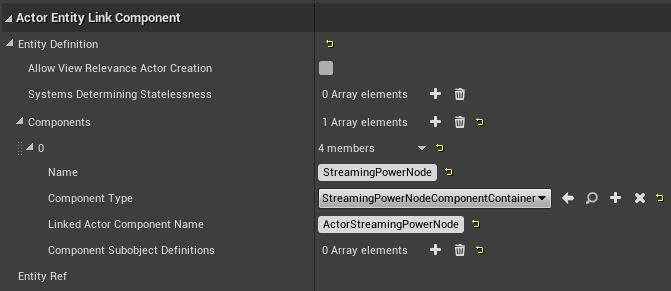
How can I have my item consume/produce power?
Add a PowerComponent to your PhysicalItem with the “Net Power Output” field set to either a positive value (generated power in U/s) or a negative value (consumed power in U/s). If power is being generated, check the “Is Generator” checkbox.
How can I add a custom interaction to my item?
Under the PhysicalItem’s “Clickable Component”, enable the “Has Use Interaction by Default” field, and, if applicable, enable the “Has Aux Slot Use by Default”, “Has Actuator Use by Default”, and the “Has Use While Player Driving” fields. Change the “Default Use Context” field to whatever should be displayed by default in the item tooltip as the “use context”.
Then, add the “InputAction Use” event to the Event Graph (under Input, Action Events, Use), and attach whatever blueprint code you would like to execute when the item is used to the “Pressed” node.
You can use the “Set Active Use Context” node to change the current use context (for example, to change the tooltip text from “Turn On” to “Turn Off”).
How can I execute some Blueprint code on game load, or every tick?
Create a new Actor, and implement your code under the “Event BeginPlay” node, or the “Event Tick” node, as desired. Then, add the package file name for your new actor to the persistent_actors integrator entry in your metadata.json file, which will instruct the integrator to add your actor to the level.
Alternatively, you can instead create a new Actor Component, and add the path to your new Actor Component to your metadata.json file under /Game/Globals/PlayControllerInstance in the linked_actor_components entry. This will attach your custom ActorComponent to each Player Controller. An older style of mod development, pioneered before the creation of the persistent_actors integrator entry, was to spawn an Actor into the level (if one did not already exist) within an Actor Component attached to the Player Controller.
“Event BeginPlay” will be executed when the game fully loads, and it will also be executed whenever a save is loaded (on a different instance of the Actor).
How can I make my custom Actor get saved when the user saves the game?
After cooking your assets, you will have to use UAssetGUI to add a new “bSaveGameRelevant” BoolProperty set to “true” within the class default object. This step is not necessary for PhysicalItem classes, which automatically have bSaveGameRelevant set to true.
How can I allow my users to configure my mod?
You can expose a blueprint property to be configurable by checking the “Config Variable” flag on the property (you may need to click the “Show Advanced” arrow button to see this option). This allows users to specify a custom entry in the Engine.ini file to change the property’s default value. The new entry will be available in the Engine.ini file under the header [/Game/Path/To/Your/ActorFileName.ActorFileName_C] (with the appropriate path and file name).
How can I have one of my custom missions be activated by a vanilla mission?
The following blueprint code is part of the Rocket Launcher Mod example by atenfyr in the AstroTechies ModdingKit, and is placed in a persistent actor:
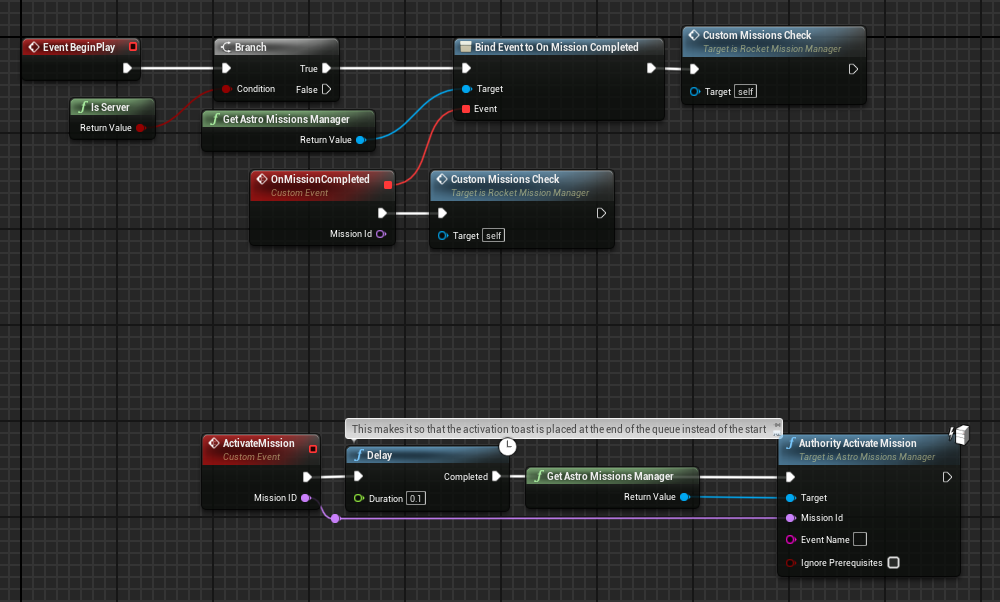
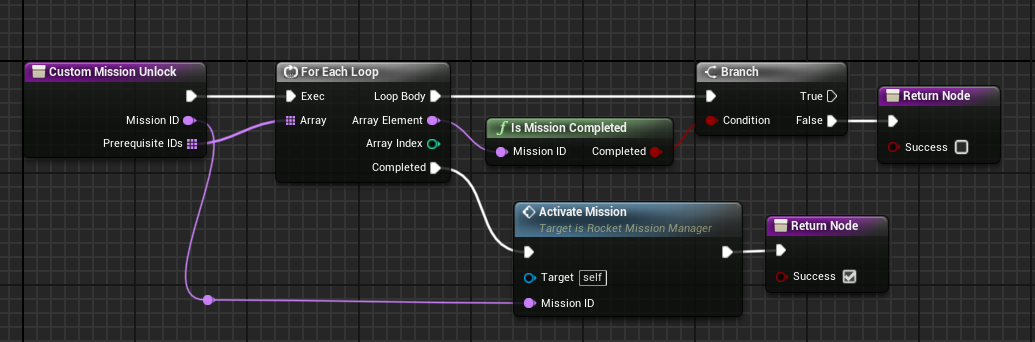
How can I detect which mod loader the user is using?
Refer to the code segment below. You must reference IntegratorStatics_BP in the construct node. AstroModIntegrator Classic will return a version like “Classic 1.6.2.0”, while astro_modloader (Rust) will return a version like “0.1.12”.
How can I get a list of all mods that are enabled?
Refer to the code segment below. “Out” is a local variable; it is a map with the key type set to “Name” and the value type set to “Mod”. This code is compatible with both AstroModLoader Classic and astro_modloader (Rust).
How can I summon a resource nugget?
This question was contributed by Discord user ChunkySpaceman in the Astroneer Modding Discord server’s #mod-resources channel.
How can I add oxygen support to an item?
This question was contributed by Discord user thecodingpro in the Astroneer Modding Discord server’s #mod-resources channel. It is their sole intellectual property and not of the AstroTechies organization, and is included here by explicit permission.
How can I get the data of all the missions that the player has tracked?
This question was contributed by Discord user g.dutch in the Astroneer Modding Discord server’s #mod-resources channel. It is their sole intellectual property and not of the AstroTechies organization, and is included here by explicit permission.
How can I generate a unique ID for a save game?
This technique was contributed by Discord user g.dutch in the Astroneer Modding Discord server’s #mod-resources channel. It is their sole intellectual property and not of the AstroTechies organization, and is included here by explicit permission.
How can I consume a slotted resource?
Execute the “Take Item Rate Delta” function every tick. Pass the Event Tick “Delta Seconds” parameter into the “Take Item Rate Delta” function’s “Delta Time” parameter.
You can use the Child Slot Component “Make Reference” function to obtain a Slot Reference to then pass into the “Take Item Rate Delta” function.
How do I set how much scrap an item will produce?
You do not need to manually specify this value, because it is automatically calculated based on the item’s recipe. Make sure that “Can be Scrapped” on the ItemType is checked.
How do I create a custom crate overlay texture?
Add the following entry to your metadata.json file. If the “integrator” tag already exists in your metadata.json file, merge these new entries with your existing entries.
"integrator": {
    "crate_overlay_textures": [ "/Game/Mods/Path/To/Texture/ui_icon_package_my_new_texture" ]
}
Replace /Game/Mods/Path/To/Texture/ui_icon_package_my_new_texture with the package path of your new crate texture in the Unreal Editor. This texture should have a white background with a transparent logo on top. You may wish to refer to the following example texture: ui_icon_package_ball_beach.png

You will also need to set the “Crate Overlay Texture” of your ItemType class in the Unreal Editor to point to your new texture.
This feature is currently only supported by AstroModLoader Classic v1.8.1.0 and higher. If you would like your mod to be compatible with astro_modloader (Rust) or older versions of AstroModLoader Classic, you can also emulate this behavior manually in the Unreal Editor by using the more complex procedure provided below.
Alternative technique for adding custom crate overlay textures
Create a custom Material Instance (right-click in a folder -> “Materials & Textures” -> “Material Instance”) with any name. Set the Parent of the MI to the asset at /Game/Materials/modules/palette_exo_dynamic_lights_overlay. Set the “Overlay_Graphic” texture parameter to your new texture and the “RefractionDepthBias” scalar parameter set to 0 (all other parameters can be left as-is).
Then, implement the following blueprint source code within a new Actor in your mod’s directory named “SingletonModifierActor” (or similar). Replace the first value with the file name (not path) of your new texture, and select your new Material Instance as the second value. While selecting the Actor in the Components panel, tick “Always Relevant” and “Actor Hidden In Game” and untick “Start with Tick Enabled” in the Details panel.
Add the package path of this Actor to the “persistent_actors” array in your metadata.json file.
How can I speed up the mod deployment process (cook, copy files, package, integrate, launch)?
Several tools have been created to help automate the mod deployment process, such as GDutch’s AstroModPackager or the ModDeployer plugin that is included with the AstroTechies ModdingKit.
With the AstroTechies ModdingKit installed, you can open the ModDeployer plugin in the Unreal Editor by selecting Window -> Mod Deployer. Then, press the “Help” button within the Mod Deployer window to obtain further instructions on how the plugin is used. You can later choose Window -> Quick Deploy or press F5 (by default) to instantly execute the “Run everything” action.
How can I extract sounds from the game?
Sounds in Astroneer are stored as Wwise .wem files, with many .wem files being contained within Wwise .bnk archive files located in the Astro/Content/WwiseAudio/Windows directory. You can extract .bnk archive files using tools like FModel, eXpl0it3r’s bnkextr, or monkeyman192’s bnkEditor. Astroneer .wem files can be converted to-and-from .wav files using atenfyr’s wem2wav2wem.py script.
How can I modify sounds?
As of the time of writing, the only tool verified to be functional for modifying Astroneer .bnk files is EtiTheSpirit’s BNKReplacer. You can extract sounds from the game using the tools mentioned in the previous question, modify the sounds as needed, and use BNKReplacer to convert the extracted files to .wem and replace them within .bnk files.
Can I add custom cosmetics to the game?
We heavily discourage modders from attempting to add custom cosmetics to the game or otherwise tamper with the game’s cosmetics systems. The ability to create or modify cosmetics would directly conflict with System Era’s systems for paid cosmetics, which could pose a threat to the modding community as a whole.
Where can I find some example mods?
A variety of example mods are provided as part of the AstroTechies ModdingKit, in the Astro/Content/Mods directory. You are encouraged to refer to these examples while creating your own mods.
UE4SS Questions
What is UE4SS, and what can I use it for?
UE4SS (the Unreal Engine 4/5 Scripting System) is a powerful open-source framework for scripting and modding Unreal Engine games at runtime. UE4SS allows you to execute Lua scripts (or even inject custom C++ mods) that can reference and manipulate arbitrarily Unreal Engine objects and properties in real-time. You can find more information about UE4SS on the UE4SS-RE/RE-UE4SS GitHub repository.
In the context of Astroneer mods, UE4SS is often used specifically for accessing properties and functions that are inaccessible through blueprints, or for creating hooks into engine functions to accomplish tasks that would be much more complex or impossible to perform through blueprints alone. Most mods do not necessarily need to use UE4SS, but a UE4SS script can often significantly reduce the complexity of implementation for some mods, or accomplish things that are not possible to do through blueprints alone (such as file access or Internet access).
One common development strategy is to use UE4SS primarily to directly hook certain functions or access certain properties as required, and then perform the bulk of the logic within blueprints by executing blueprint methods via Lua. You may wish to reference these guides for the video game Palworld for more information on developing Lua scripts for UE4SS: https://pwmodding.wiki/docs/category/lua-modding
How can I add a UE4SS .lua script to my mod?
Set the “enable_ue4ss” field to “true” in your metadata.json file, as in the example below:
{
    "schema_version": 2,
    "name": "Tutorial Mod",
    "mod_id": "TutorialMod",
    "author": "YOUR_NAME",
    "description": "A tutorial mod.",
    "version": "0.1.0",
    "sync": "serverclient",
    "enable_ue4ss": true
}
Then, add a .lua script within your .pak file at the path UE4SS\Scripts\main.lua (where the UE4SS directory is at the root of your .pak file). If you are developing a C++ mod, you may place your .dll file at UE4SS\dlls\main.dll within your .pak file.
You may wish to examine the following main.lua script as an example for testing UE4SS capability. The UEHelpers.lua and AstroHelpers.lua files are provided as shared libraries automatically by AstroModLoader Classic and AutoIntegrator-based mod loaders.
main.lua
local UEHelpers = require("UEHelpers")
local AstroHelpers = require("AstroHelpers")

function go()
    print("Logging")
    local a, b, c = UE4SS:GetVersion()
    local all_mods = ""
    local test2 = {}
    AstroHelpers:GetIntegratorAPI():GetAllModNames(UEHelpers:GetWorldContextObject(), test2)
    for i = 1, #test2 do
        all_mods = all_mods .. test2[i]:get():ToString() .. " "
    end

    local f = io.open("UE4SS_AML_TEST.log", "w")
    f:write("Welcome to UE4SS!\n")
    f:write("UE4SS: " .. a .. "." .. b .. "." .. c .. "\n")
    f:write("Astroneer: " .. AstroHelpers.GetGameVersion() .. "\n")
    f:write("Integrator: " .. AstroHelpers.GetIntegratorVersion() .. "\n")
    f:write("Mods: " .. all_mods .. "\n")
    f:close()
end

NotifyOnNewObject("/Script/Engine.PlayerController", go)
UEHelpers.lua (as of 2025-12-31)
-- This source code is adapted from the UE4SS repository.
-- https://github.com/UE4SS-RE/RE-UE4SS
-- See the following software license:

-- MIT License
--
-- Copyright (c) 2022 Narknon
--
-- Permission is hereby granted, free of charge, to any person obtaining a copy
-- of this software and associated documentation files (the "Software"), to deal
-- in the Software without restriction, including without limitation the rights
-- to use, copy, modify, merge, publish, distribute, sublicense, and/or sell
-- copies of the Software, and to permit persons to whom the Software is
-- furnished to do so, subject to the following conditions:
--
-- The above copyright notice and this permission notice shall be included in all
-- copies or substantial portions of the Software.
--
-- THE SOFTWARE IS PROVIDED "AS IS", WITHOUT WARRANTY OF ANY KIND, EXPRESS OR
-- IMPLIED, INCLUDING BUT NOT LIMITED TO THE WARRANTIES OF MERCHANTABILITY,
-- FITNESS FOR A PARTICULAR PURPOSE AND NONINFRINGEMENT. IN NO EVENT SHALL THE
-- AUTHORS OR COPYRIGHT HOLDERS BE LIABLE FOR ANY CLAIM, DAMAGES OR OTHER
-- LIABILITY, WHETHER IN AN ACTION OF CONTRACT, TORT OR OTHERWISE, ARISING FROM,
-- OUT OF OR IN CONNECTION WITH THE SOFTWARE OR THE USE OR OTHER DEALINGS IN THE
-- SOFTWARE.

local UEHelpers = {}
-- Uncomment the below require to use the Lua VM profiler on these functions
-- local jsb = require("jsbProfiler.jsbProfi")

-- Version 1 does not exist, we start at version 2 because the original version didn't have a version at all.
local Version = 3

-- Functions and classes local to this module, do not attempt to use!

---@param ObjectFullName string
---@param VariableName string
---@param ForceInvalidateCache boolean?
---@return UObject
function UEHelpers.CacheDefaultObject(ObjectFullName, VariableName, ForceInvalidateCache)
    local DefaultObject = CreateInvalidObject()

    if not ForceInvalidateCache then
        DefaultObject = ModRef:GetSharedVariable(VariableName)
        if DefaultObject and DefaultObject:IsValid() then return DefaultObject end
    end

    DefaultObject = StaticFindObject(ObjectFullName)
    ModRef:SetSharedVariable(VariableName, DefaultObject)
    if not DefaultObject:IsValid() then error(string.format("%s not found", ObjectFullName)) end

    return DefaultObject
end

-- Everything in this section can be used in any mod that requires this module.
-- Exported functions -> START

function UEHelpers.GetUEHelpersVersion()
    return Version
end

local EngineCache = CreateInvalidObject() ---@cast EngineCache UEngine
---Returns instance of UEngine
---@return UEngine
function UEHelpers.GetEngine()
    if EngineCache:IsValid() then return EngineCache end

    EngineCache = FindFirstOf("Engine") ---@cast EngineCache UEngine
    return EngineCache
end

local GameInstanceCache = CreateInvalidObject() ---@cast GameInstanceCache UGameInstance
---Returns instance of UGameInstance
---@return UGameInstance
function UEHelpers.GetGameInstance()
    if GameInstanceCache:IsValid() then return GameInstanceCache end

    GameInstanceCache = FindFirstOf("GameInstance") ---@cast GameInstanceCache UGameInstance
    return GameInstanceCache
end

---Returns the main UGameViewportClient (doesn't exist on a server)
---@return UGameViewportClient
function UEHelpers.GetGameViewportClient()
    local Engine = UEHelpers.GetEngine()
    if Engine:IsValid() and Engine.GameViewport then
        return Engine.GameViewport
    end
    return CreateInvalidObject() ---@type UGameViewportClient
end

local PlayerControllerCache = CreateInvalidObject() ---@cast PlayerControllerCache APlayerController
---Returns first player controller.<br>
---In most games, a valid player controller is available from the start.<br>
---There are no player controllers on the server until a player joins the server.
---@return APlayerController
function UEHelpers.GetPlayerController()
    if PlayerControllerCache:IsValid() then return PlayerControllerCache end

    -- local Controllers = jsb.simpleBench("FindAllOf: PlayerController", FindAllOf, "PlayerController")
    -- Controllers = jsb.simpleBench("FindAllOf: Controller", FindAllOf, "Controller")
    local Controllers = FindAllOf("PlayerController") or FindAllOf("Controller") ---@type AController[]?
    if Controllers then
        for _, Controller in ipairs(Controllers) do
            if Controller:IsValid() and (Controller.IsPlayerController and Controller:IsPlayerController() or Controller:IsLocalPlayerController()) then
                PlayerControllerCache = Controller
                break
            end
        end
    end

    return PlayerControllerCache
end

---Returns local player pawn
---@return APawn
function UEHelpers.GetPlayer()
    local playerController = UEHelpers.GetPlayerController()
    if playerController:IsValid() and playerController.Pawn then
        return playerController.Pawn
    end
    return CreateInvalidObject() ---@type APawn
end

local WorldCache = CreateInvalidObject() ---@cast WorldCache UWorld
---Returns the main UWorld
---@return UWorld
function UEHelpers.GetWorld()
    if WorldCache:IsValid() then return WorldCache end

    local PlayerController = UEHelpers.GetPlayerController()
    if PlayerController:IsValid() then
        WorldCache = PlayerController:GetWorld()
    else
        local GameInstance = UEHelpers.GetGameInstance()
        if GameInstance:IsValid() then
            WorldCache = GameInstance:GetWorld()
        end
    end
    return WorldCache
end

---Returns UWorld->PersistentLevel
---@return ULevel
function UEHelpers.GetPersistentLevel()
    local World = UEHelpers.GetWorld()
    if World:IsValid() and World.PersistentLevel then
        return World.PersistentLevel
    end
    return CreateInvalidObject() ---@type ULevel
end

---Returns UWorld->AuthorityGameMode<br>
---The function doesn't guarantee it to be an AGameMode, as many games derive their own game modes directly from AGameModeBase!
---@return AGameModeBase
function UEHelpers.GetGameModeBase()
    local World = UEHelpers.GetWorld()
    if World:IsValid() and World.AuthorityGameMode then
        return World.AuthorityGameMode
    end
    return CreateInvalidObject() ---@type AGameModeBase
end

---Returns UWorld->GameState<br>
---The function doesn't guarantee it to be an AGameState, as many games derive their own game states directly from AGameStateBase!
---@return AGameStateBase
function UEHelpers.GetGameStateBase()
    local World = UEHelpers.GetWorld()
    if World:IsValid() and World.GameState then
        return World.GameState
    end
    return CreateInvalidObject() ---@type AGameStateBase
end

---Returns PersistentLevel->WorldSettings
---@return AWorldSettings
function UEHelpers.GetWorldSettings()
    local PersistentLevel = UEHelpers.GetPersistentLevel()
    if PersistentLevel:IsValid() and PersistentLevel.WorldSettings then
        return PersistentLevel.WorldSettings
    end
    return CreateInvalidObject() ---@type AWorldSettings
end

--- Returns an object that's useable with UFunctions that have a WorldContext parameter.<br>
--- Prefer to use an actor that you already have access to whenever possible over this function.
--- Any UObject that has a GetWorld() function can be used as WorldContext.
---@return UObject
function UEHelpers.GetWorldContextObject()
    return UEHelpers.GetWorld()
end

---Returns an array of all players APlayerState
---@return APlayerState[]
function UEHelpers.GetAllPlayerStates()
    local PlayerStates = {}
    local GameState = UEHelpers.GetGameStateBase()
    if GameState:IsValid() and GameState.PlayerArray then
        for i = 1, #GameState.PlayerArray do
            table.insert(PlayerStates, GameState.PlayerArray[i])
        end
    end
    return PlayerStates
end

---Returns all players as APawn.<br>
---You can use `IsA` function to check the type of APawn to make sure it's the player class of the game.
---@return APawn[]
function UEHelpers.GetAllPlayers()
    local PlayerPawns = {}
    local PlayerStates = UEHelpers.GetAllPlayerStates()
    if PlayerStates then
        for i = 1, #PlayerStates do
            local Pawn = PlayerStates[i].PawnPrivate
            if Pawn and Pawn:IsValid() then
                table.insert(PlayerPawns, Pawn)
            end
        end
    end
    return PlayerPawns
end

---Returns hit actor from FHitResult.<br>
---The function handles the struct differance between UE4 and UE5
---@param HitResult FHitResult
---@return AActor|UObject
function UEHelpers.GetActorFromHitResult(HitResult)
    if not HitResult or not HitResult:IsValid() then
        return CreateInvalidObject() ---@type AActor
    end

    if UnrealVersion:IsBelow(5, 0) then
        return HitResult.Actor:Get()
    elseif UnrealVersion:IsBelow(5, 4) then
        return HitResult.HitObjectHandle.Actor:Get()
    end
    return HitResult.HitObjectHandle.ReferenceObject:Get()
end

---@param ForceInvalidateCache boolean? # Force update the cache
---@return UGameplayStatics
function UEHelpers.GetGameplayStatics(ForceInvalidateCache)
    ---@type UGameplayStatics
    return UEHelpers.CacheDefaultObject("/Script/Engine.Default__GameplayStatics", "UEHelpers_GameplayStatics", ForceInvalidateCache)
end

---@param ForceInvalidateCache boolean? # Force update the cache
---@return UKismetSystemLibrary
function UEHelpers.GetKismetSystemLibrary(ForceInvalidateCache)
    ---@type UKismetSystemLibrary
    return UEHelpers.CacheDefaultObject("/Script/Engine.Default__KismetSystemLibrary", "UEHelpers_KismetSystemLibrary", ForceInvalidateCache)
end

---@param ForceInvalidateCache boolean? # Force update the cache
---@return UKismetMathLibrary
function UEHelpers.GetKismetMathLibrary(ForceInvalidateCache)
    ---@type UKismetMathLibrary
    return UEHelpers.CacheDefaultObject("/Script/Engine.Default__KismetMathLibrary", "UEHelpers_KismetMathLibrary", ForceInvalidateCache)
end

---@param ForceInvalidateCache boolean? # Force update the cache
---@return UKismetStringLibrary
function UEHelpers.GetKismetStringLibrary(ForceInvalidateCache)
    ---@type UKismetStringLibrary
    return UEHelpers.CacheDefaultObject("/Script/Engine.Default__KismetStringLibrary", "UEHelpers_KismetStringLibrary", ForceInvalidateCache)
end

---@param ForceInvalidateCache boolean? # Force update the cache
---@return UKismetTextLibrary
function UEHelpers.GetKismetTextLibrary(ForceInvalidateCache)
    ---@type UKismetTextLibrary
    return UEHelpers.CacheDefaultObject("/Script/Engine.Default__KismetTextLibrary", "UEHelpers_KismetTextLibrary", ForceInvalidateCache)
end

---@param ForceInvalidateCache boolean? # Force update the cache
---@return UGameMapsSettings
function UEHelpers.GetGameMapsSettings(ForceInvalidateCache)
    ---@type UGameMapsSettings
    return UEHelpers.CacheDefaultObject("/Script/EngineSettings.Default__GameMapsSettings", "UEHelpers_GameMapsSettings", ForceInvalidateCache)
end

---Returns found FName or "None" FName if the operation faled
---@param Name string
---@return FName
function UEHelpers.FindFName(Name)
    return FName(Name, EFindName.FNAME_Find)
end

---Returns added FName or "None" FName if the operation faled
---@param Name string
---@return FName
function UEHelpers.AddFName(Name)
    return FName(Name, EFindName.FNAME_Add)
end

---Tries to find existing FName, if it doesn't exist a new FName will be added to the pool
---@param Name string
---@return FName # Returns found or added FName, “None” FName if both operations fail
function UEHelpers.FindOrAddFName(Name)
    local NameFound = FName(Name, EFindName.FNAME_Find)
    if NameFound == NAME_None then
        NameFound = FName(Name, EFindName.FNAME_Add)
    end
    return NameFound
end

-- Exported functions -> END

return UEHelpers
AstroHelpers.lua (as of 2025-12-31)
-- Copyright (c) 2024 AstroTechies, atenfyr. See: https://github.com/atenfyr/AstroModLoader-Classic/blob/master/LICENSE.md

local UEHelpers = require("UEHelpers")

local AstroHelpers = {}

function AstroHelpers.GetIntegratorAPI(ForceInvalidateCache)
    return UEHelpers.CacheDefaultObject("/Game/Integrator/IntegratorAPI.Default__IntegratorAPI_C", "AstroHelpers_IntegratorAPI", ForceInvalidateCache)
end

local statics_cache = nil
function AstroHelpers.GetIntegratorStatics(ForceInvalidateCache)
    if ForceInvalidateCache then statics_cache = nil end

    if statics_cache == nil then
        local statics_raw = {}
        AstroHelpers:GetIntegratorAPI():GetIntegratorStatics(UEHelpers:GetWorldContextObject(), statics_raw)
        statics_cache = statics_raw["IntegratorStatics"]
    end
    return statics_cache
end

function AstroHelpers.GetIntegratorVersion()
    return AstroHelpers.GetIntegratorStatics()["IntegratorVersion"]:ToString()
end

function AstroHelpers.GetGameVersion(ForceInvalidateCache)
    return UEHelpers.CacheDefaultObject("/Script/EngineSettings.Default__GeneralProjectSettings", "AstroHelpers_GeneralProjectSettings", ForceInvalidateCache)["ProjectVersion"]:ToString()
end

function AstroHelpers.Sleep(n)
    os.execute("ping -n " .. tonumber(n + 1) .. " localhost > NUL")
end

return AstroHelpers
Warning
UE4SS mods are only supported by AstroModLoader Classic and AstroModIntegrator Classic-based mod loaders (such as AutoIntegrator, Vortex Mod Manager). If the enable_ue4ss field is specified, your mod will no longer be compatible with astro_modloader (Rust).
What is AutoIntegrator?
atenfyr’s AutoIntegrator is a UE4SS C++ mod that allows AstroModLoader .pak mods to be loaded as typical UE4SS LogicMods. It does this by executing AstroModIntegrator Classic in the background every time that the game launches. The mod is not required for users to use UE4SS with Astroneer, but it can help reduce reliance on external mod management software.